Comprehensive Guide to APM Tools: Navigating Performance Management
Vishal Sharma
Apr 14, 2026
Performance issues rarely start as outages.
They start as small delays.
A checkout that takes two seconds longer than usual.
An API that slows down only during peak traffic.
A service that works fine in isolation but fails under real user load.
Individually, these problems seem minor. Together, they shape how users experience your application.
The real challenge is not fixing performance issues. It is tracing them across services before they turn into user-facing problems.
This is the problem with modern application environments. Things can go wrong at the database layer, inside a microservice, across an API call, or in the front-end browser. And your team might not know until the support tickets start piling up. By then, the damage is already done.
APM tools can change that.
Application performance monitoring tools give you a connected view of your entire application stack. They help you understand how every component behaves, how issues propagate, and where performance actually breaks down. Instead of guessing, teams can trace problems directly to the source and resolve them faster.
Think of them as a continuous diagnostic system that runs 24/7 in the background, catching performance issues before they become customer-facing problems.
This guide helps you understand how APM tools uncover performance bottlenecks, reduce downtime, and improve user experience. It also highlights the top tools in 2026, how they’re used across industries, and what to look for when evaluating the right fit for your needs.
Expert Insight
How is AI transforming Application Performance Monitoring in 2026?
“AI is redefining Application Performance Monitoring from a reactive reporting layer into a proactive, predictive intelligence system. Organizations that embrace shift-left monitoring and unified telemetry will not only detect issues earlier but also accelerate root-cause analysis. However, success depends on bridging the skills gap and fostering a culture that treats performance insights as opportunities for improvement, not blame.” — Kumar Khurana
What Are Application Performance Monitoring (APM) Tools?
Application Performance Monitoring (APM) is the practice of monitoring how applications perform in real time, helping teams quickly detect, diagnose, and fix issues across the user experience, code, and underlying infrastructure.
APM tools collect telemetry data from across your application stack: response times, error rates, transaction flows, CPU usage, database query times, and user behavior. They then surface this data through dashboards, alerts, and trace visualizations so your team can spot, investigate, and fix issues fast.
Unlike basic server monitoring, which only signals that something is wrong, application performance monitoring connects the dots.
It shows exactly which service caused a slowdown, which database query took 4 seconds instead of 40 milliseconds, and how many users were impacted.
This level of visibility is what turns hours of troubleshooting into minutes of resolution.
Core Capabilities of APM Solutions
Most modern APM solutions are built around five foundational capabilities. Here is what each one actually does:
| Capability | What It Does | Why It Matters |
|---|---|---|
| Application Topology Mapping and Visualization | Automatically discovers how services, APIs, and databases connect to each other | Gives teams a live dependency map so they know what is connected to what before an incident happens |
| User Experience and Performance Monitoring | Tracks real user interactions across the application | Tells you how your app actually feels to users, not just how it looks on an internal dashboard |
| Transaction Tracing and Root Cause Analysis | Follows a single request across every service it touches | Pinpoints exactly where a request slowed down or failed, even across dozens of services |
| Alerting Based on Defined Thresholds | Notifies the right team the moment a metric crosses a set limit | Gets the right people informed before users feel the impact |
| Reporting and Analytics Features | Stores and surfaces historical performance data | Helps engineering and business teams make decisions based on patterns, not guesswork |
Beyond these foundations, leading APM platforms now use artificial intelligence and machine learning to detect anomalies, forecast issues, and automatically optimize system health, without requiring a human to write a rule for every scenario.
The Evolution of APM Tools in the Tech Industry
APM tools date back to the 1990s, when applications first became critical for business operations. Early solutions were simple and focused almost entirely on uptime—answering one basic question: Is the server running or not? That was enough when a single monolithic application ran on a handful of servers.
Then the architectures changed. Monoliths gave way to microservices, containers, and Kubernetes clusters. A single user request today might touch 10 to 35 separate services before returning a response.
This shift forced a new generation of application performance management tools to emerge. These tools could trace requests across distributed systems, analyze logs alongside metrics, correlate user behavior with infrastructure health, and integrate directly into CI/CD pipelines. Observability became the new north star for engineering teams.
The result is a fast-growing market. According to Fortune Business Insights, the global APM market is valued at $11.36 billion in 2026 and is projected to reach $35.66 billion by 2034, growing at a compound annual growth rate of 15.37%. That growth is not driven by hype. It is driven by businesses that have already felt the cost of flying blind across their application stack.
Best APM Tools in 2026

There is no single best APM tool for every team. The right choice depends on your architecture, team size, cloud environment, and budget. But these are the platforms that consistently rank at the top in 2026 evaluations.
Datadog
Datadog is one of the most widely deployed APM monitoring tools for cloud-native teams. It brings together APM, log management, infrastructure monitoring, real user monitoring, and security in one platform, with over 900 integrations out of the box. Its machine-learning-powered anomaly detection flags issues before they escalate, and the unified dashboard provides SRE and DevOps teams with a single view across the entire stack. In 2026, Datadog added “Bits AI SRE” for autonomous alert investigations and GPU monitoring for AI workloads.
Best for: Cloud-native teams and scale-ups running complex, distributed architectures.
Dynatrace
Dynatrace is the go-to for large enterprises managing hundreds or thousands of services. Its OneAgent technology automatically discovers and instruments every component in your environment, no manual configuration needed. The Davis AI engine does not just flag problems. It correlates events across your topology and tells you the root cause directly. If your e-commerce checkout is slow, Dynatrace traces it to the exact database query or container restart causing the delay. Recent updates include eBPF-based APM for instant Kubernetes insights.
Best for: Enterprises running Kubernetes at scale with complex multi-cloud environments.
New Relic
New Relic built its reputation as a developer-first APM platform and has since expanded into a full-stack observability tool. It connects traces, metrics, logs, and user data into a single NRDB (New Relic Database) so you can query across everything using NRQL, New Relic’s own query language. Its ingest-based pricing means you pay for what you use, which works well for smaller teams.
Best for: Teams wanting one unified tool across apps, infrastructure, and user experience without managing multiple vendors.
AppDynamics (Cisco)
AppDynamics connects technical performance to business outcomes in a way few other APM software platforms do. It maps business transactions like “place an order” or “process a payment” directly to the code and infrastructure behind them. When a transaction slows down, you see the business impact in dollars, not just milliseconds. Its Cognition Engine automatically correlates anomalies and suggests root causes.
Best for: Enterprises focused on business transaction monitoring, especially Java/.NET and SAP environments.
IBM Instana
IBM Instana focuses on speed of detection and resolution. According to IBM, Instana resolves full-stack incidents up to 80% faster than traditional approaches, with support for over 300 technologies and integrations. It automatically discovers every component in your environment and updates its dependency map in real time.
Best for: Teams managing high-traffic microservices where fast incident response is non-negotiable.
Elastic APM
Elastic APM is part of the Elastic Stack (ELK) and collects performance metrics, errors, and distributed traces, all stored in Elasticsearch and visualized in Kibana alongside your logs. If your team already runs Elasticsearch for logging, adding APM is a natural extension. The tradeoff is that managing the Elastic Stack infrastructure at scale can be resource-intensive.
Best for: Teams already using the ELK stack who want to add APM without bringing in a separate vendor.
SigNoz (Open Source)
SigNoz has become the most capable open-source APM tool in 2026 for teams that want full data ownership and predictable costs. Built natively on OpenTelemetry and ClickHouse for high-performance storage, it offers distributed tracing, metrics monitoring, and log management in a single interface, without vendor lock-in.
Best for: Teams committed to open source who want a viable alternative to Datadog or New Relic without the unpredictable billing.
Quick Comparison: Top APM Tools in 2026
Not every tool fits every team; here’s how the leading platforms stack up across the dimensions that matter most.
| APM Tool | Best For | Standout Capability | Deployment | Open Source? |
|---|---|---|---|---|
| Datadog | Cloud-native teams, scale-ups | Unified APM + Logs + RUM + AI anomaly detection | SaaS | No |
| Dynatrace | Large enterprises, Kubernetes | Davis AI + OneAgent auto-instrumentation | SaaS / On-prem | No |
| New Relic | SMB to enterprise | Ingest-based pricing, unified NRDB | SaaS | No |
| AppDynamics | Enterprise, Java/.NET, SAP | Business transaction visibility | SaaS / On-prem | No |
| IBM Instana | High-traffic microservices | 300+ integrations, 80% faster incident resolution | SaaS / On-prem | No |
| Elastic APM | Teams using the ELK stack | Elasticsearch-powered search and analytics | Self-hosted / Cloud | Yes (partial) |
| SigNoz | Open-source, cost-conscious teams | OpenTelemetry-native, full data ownership | Self-hosted / Cloud | Yes |
Why Businesses Need APM Tools
Performance issues rarely announce themselves. They creep in quietly—a database query that was fast last month but now takes a second longer, a third-party API that worked perfectly in development but struggles under production load, or a memory leak that only surfaces after 72 hours of uptime.
By the time users notice and leave, the issue has already been live for hours. Studies consistently show that a one-second delay in page load time can reduce conversions by 7%. For an e-commerce platform doing $50,000 a day, that is $3,500 gone from a single second of latency.
Beyond revenue, there is the cost of debugging without visibility. Engineering teams waste hours on incidents that a proper APM monitoring tool would resolve in minutes. Modern application architectures built on microservices, containers, and serverless functions make root cause analysis nearly impossible without distributed tracing. You need a tool that follows the request, not just the server.
Key Components of APM Tools
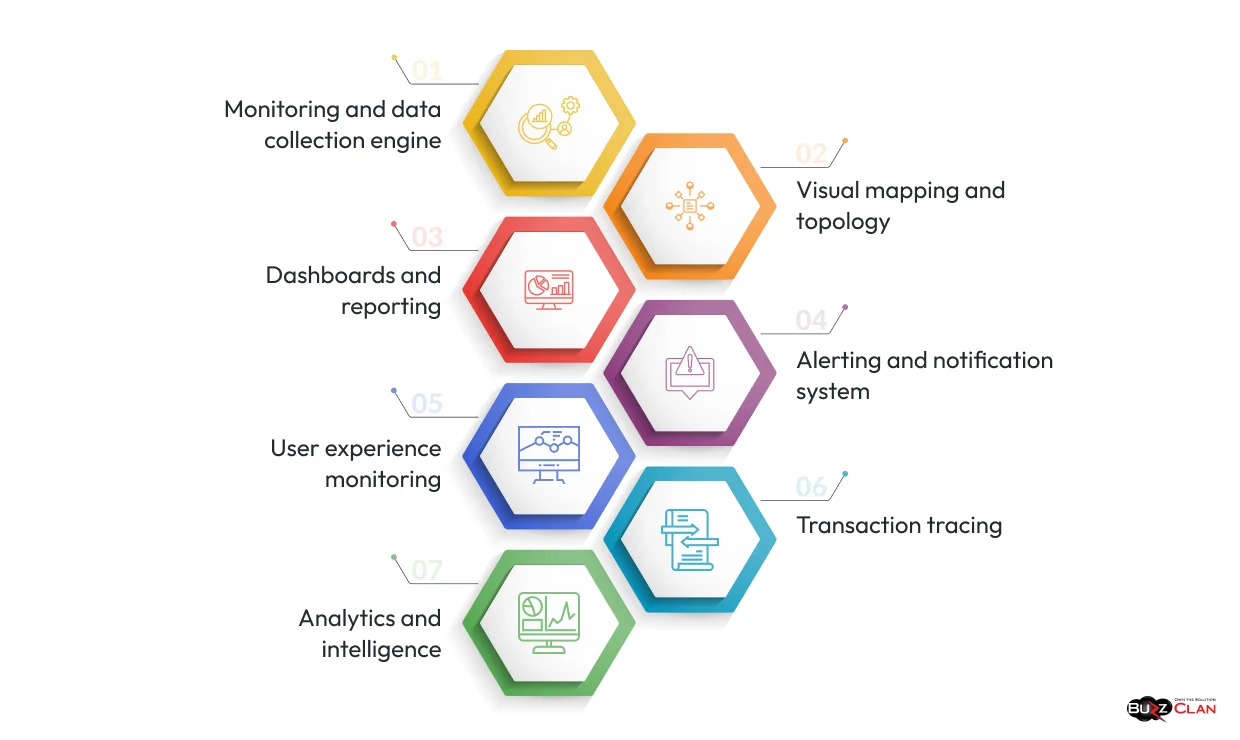
Understanding what is inside an APM platform helps you evaluate options more clearly. Most modern tools share a core set of components, and knowing how they work together is what separates informed buyers from people who just compare pricing pages.
Monitoring and Data Collection Engine
This is the foundation. It collects performance metrics from application components, servers, databases, networks, and external services. Good APM tools let you customize what gets collected and how often. Over-instrumentation creates noise, and under-instrumentation creates blind spots.
Visual Mapping and Topology
Automatically discovers how your services connect and renders it as a live dependency map. This is especially valuable in microservices environments, where understanding which service calls which is the first step in any incident response. Teams moving through legacy app modernization find this component particularly useful, as it surfaces hidden dependencies that were never documented.
Dashboards and Reporting
Real-time and historical views with KPI tracking across every layer. The best dashboards let teams drill down from a high-level service view to a specific transaction in seconds, without needing to switch tools or write complex queries. Pairing APM dashboards with cloud-based BI gives business stakeholders a version of the same data they can actually act on.
Alerting and Notification System
Let teams define performance thresholds and receive notifications the moment something drifts. The key differentiator here is not whether a tool alerts. It is whether the alerting is intelligent enough to reduce noise. Too many false positives train teams to ignore alerts, which is worse than no alerts at all.
User Experience Monitoring
Simulates and tracks real end-user journeys across services, with segmentation by location, device, browser, and connection type. This answers the question that infrastructure metrics cannot: what is the user actually experiencing right now? For teams running web application testing alongside APM, combining synthetic monitoring with real user data gives the most complete picture.
Transaction Tracing
Follows the path of a single request across a distributed architecture, from the browser click, through the API gateway, across every microservice, down to the database query, and back. This is the most powerful debugging capability in modern APM. It is what makes complex cloud infrastructure problems diagnosable in minutes rather than hours.
Analytics and Intelligence
Statistical analysis, machine learning, and AI-driven insights that find patterns humans would miss. The best APM platforms do not just tell you something is wrong. They tell you why and what is likely to happen next.
These components work together. Topology mapping makes sure you are monitoring the right things. Transaction tracing pinpoints root causes. Alerting ensures the right people know in time. And analytics turns raw monitoring data into decisions that actually improve performance over time.
Key Features of Modern Application Performance Management Tools
The APM tools available in 2026 look very different from what they were five years ago. Three major shifts have redefined what a modern platform needs to do.
OpenTelemetry Support is Non-Negotiable
It has become the industry standard for collecting telemetry data, currently the second-largest CNCF project after Kubernetes, with nearly half of all organizations either using or planning to adopt it. APM tools without native OpenTelemetry support force teams into vendor lock-in and costly migrations, worth considering when evaluating open source vs. proprietary software for your observability stack.
AI-Driven Root Cause Analysis is Now a Core Expectation
Manual alert correlation across distributed systems takes too long during an incident. The best APM tools now use AI to automatically correlate anomalies, eliminate false positives, and surface the probable root cause within seconds, dramatically reducing (MTTR). Teams integrating AI and data analytics into their engineering workflows see the biggest gains here.
Kubernetes and Container-Native Support is Essential
An APM tool that treats every container as a static server misses the point entirely. You need a platform that understands pods, nodes, namespaces, and autoscaling events, and updates its topology map automatically as your environment changes.
RUM and Synthetic Monitoring Work Better Together
Real User Monitoring tells you what live users experienced, while synthetic monitoring tests your application proactively before issues reach production audiences. This combination is particularly important for teams focused on website performance as a business metric.
Top Open-Source APM Tools Available in the Market
Commercial platforms have their place, but open-source APM tools now offer the depth and flexibility required for modern, distributed systems. Engineering teams increasingly adopt them not just for cost efficiency, but for greater control, extensibility, and ownership.
| Open-Source APM Tool | Primary Focus | Built On | Best For |
|---|---|---|---|
| SigNoz | Full-stack APM: traces, metrics, logs | OpenTelemetry + ClickHouse | Teams wanting a Datadog alternative with data ownership |
| Grafana (LGTM Stack) | Visualization + full observability | Loki, Tempo, Mimir, Grafana | Teams wanting maximum flexibility and self-hosted control |
| Jaeger | Distributed tracing only | OpenTelemetry compatible | Teams needing trace visibility without a full platform |
| Apache SkyWalking | Distributed tracing + service mesh telemetry | Java-native, multi-language | Java-heavy enterprise environments |
| Elastic APM (Open-Source Tier) | APM integrated with log search | Elasticsearch + Kibana | Teams are already running the ELK stack |
Advantages of Open-Source APM Tools
While commercial solutions offer enterprise-grade capabilities, open-source APM tools have their unique benefits:
Cost
Cost is the obvious benefit, but it is not the whole story. Open-source APM tools avoid expensive licensing models that scale unpredictably with data volume, a real concern as teams instrument more services. You pay for infrastructure, not per-seat or per-host fees. For organizations already thinking carefully about cloud cost optimization, this matters a lot.
Customizability
It matters in specialized environments; when your observability requirements do not fit a vendor’s assumptions, open-source tools let you extend them. Proprietary agents give you whatever the vendor decided to build, and nothing more. Teams doing infrastructure as code often prefer open-source APM because they can version-control their entire observability configuration alongside the rest of their stack.
No Vendor Lock-ins
Large enterprises particularly value this, the ability to mix and match tools, swap components, and stay on OpenTelemetry-standard instrumentation regardless of which backend they use today. Avoiding lock-in is especially important when you are managing multi-cloud or hybrid cloud environments where no single vendor covers everything.
Innovation
Finally, open-source projects move fast because public contributions accelerate the feature roadmap in ways proprietary software cannot match. SigNoz, for example, has added Kubernetes-native features and GenAI observability support faster than most enterprise vendors.
Free and Paid APM Tools: Making the Right Choice
Free and open-source APM tools give you real capability, not just a stripped-down trial. Here is a practical comparison to help you decide:
| Factor | Free / Open-Source APM | Paid / Commercial APM |
|---|---|---|
| Upfront cost | Low to none | Moderate to high (per host, per ingest, or per seat) |
| Operational overhead | Higher: your team manages the stack | Lower: vendor manages infrastructure and updates |
| Customization | Full access to source code | Limited to the vendor’s configuration options |
| Enterprise features | Basic to intermediate | Advanced AI, RBAC, SLO tracking, 24/7 support |
| Scalability | Possible, but requires engineering effort | Built-in horizontal scaling |
| Vendor lock-in risk | Low: OpenTelemetry-compatible | Higher: proprietary agents and query languages |
Situations Where Free APM Tools Can Be Sufficient and When Paid Tools Are Necessary
For personal projects, early-stage startups, or smaller applications, open-source and free offerings provide enough observability into infrastructure health, primary traces, and logs. Grafana’s flexibility and SigNoz’s out-of-the-box experience are genuinely powerful for teams willing to invest in setup. Teams using DataOps practices can also integrate open-source APM cleanly into their existing data pipelines.
As engineering complexity and business scale grow, the economics shift. The depth of metrics, the ability to connect signals across domains, advanced troubleshooting capabilities, and round-the-clock expert support start to outweigh the sticker price of paid tools. Leading APM vendors like Datadog and New Relic are specifically built for those enterprise-grade use cases, with support models to match.
How Different Industries Use APM Tools
APM is not just a tool for tech companies. The industries getting the most value from it are often the ones where application downtime has direct, measurable consequences.
| Industry | Key Applications Monitored | Business Benefit |
|---|---|---|
| Healthcare | Patient portals, telemedicine platforms, and electronic health records | Reliable system availability for clinical staff, reduced compliance risk, improved patient experience |
| Financial Services (BFSI) | Payment APIs, trading platforms, banking apps | Sub-millisecond latency tracking, audit logging for compliance, and faster incident resolution |
| E-Commerce and Retail | Checkout flows, cart systems, product catalog APIs | Higher conversion rates, fewer abandoned carts, and peak traffic management |
| Manufacturing and IoT | Asset management software, factory floor apps, IoT data pipelines | Unified visibility across physical and digital operations, reduced downtime |
Healthcare
In healthcare, hospitals rely on patient portals, IoT-connected health devices, and electronic health records running around the clock. APM tools help IT teams monitor system performance and ensure critical applications stay available even at 3 AM during a shift change. The healthcare segment is expected to grow at the highest CAGR in the APM market through 2034, according to Fortune Business Insights (2026).
Financial Services
In financial services, a 500ms delay during peak trading or payment processing has real financial consequences. The BFSI sector led the APM market in 2025. SOC 2 compliance requirements also push financial institutions toward APM platforms with strong audit logging and data retention capabilities.
E-Commerce
In e-commerce, slow checkout flows and failed payment transactions directly reduce conversion rates. APM tools help retail teams monitor peak traffic events, identify resource constraints before high-traffic periods, and trace abandoned cart behavior back to specific performance issues in the purchase flow.
Manufacturing
In manufacturing and IoT, as factories connect equipment to cloud applications, monitoring the software layer becomes as important as monitoring the machines. Asset monitoring solutions integrated with APM give operations teams visibility into both the physical and digital layers of production systems.
Signs Your Organization Needs an APM Solution
Some organizations wait until an outage to justify the investment. These are the signals that usually show up first, and they are worth paying attention to before the outage happens.
| Warning Sign | What It Means |
|---|---|
| Incidents take hours to diagnose | You lack distributed tracing across service boundaries |
| Users report slowness, which you cannot reproduce | You have no real user monitoring in place |
| Your team writes custom scripts just to get performance data | Your existing monitoring does not surface what you actually need |
| Root cause is unclear after two or more incidents in a quarter | You need transaction tracing and anomaly correlation |
| You are moving to microservices or containers | Your current monitoring cannot follow requests across services |
| Your CI/CD pipeline has no performance gates | Regressions reach production undetected |
Your DevOps team spending more time on reactive debugging than on building is one of the clearest signs. If incidents consistently take hours to isolate across services, that time cost is real and measurable. Any one of the signals above is reason enough to evaluate APM solutions. Two or more together is urgent.
Implementing APM Tools Successfully
The technical side of APM implementation gets most of the attention. The organizational side is what causes most implementations to stall.
Many organizations struggle with selecting the right monitoring platform for their actual architecture, not the architecture they plan to have. They pick tools based on demos without testing against real workloads. They install agents and move on without configuring meaningful alerts, so the tool collects data nobody acts on. Teams get dashboards but no training on how to use them during incidents.
A successful APM rollout follows a cleaner pattern. Start with a few critical services: the ones where performance problems have the biggest impact. Instrument them fully, configure alerts with real thresholds, and run tabletop exercises where teams practice using the tool during a simulated incident. Expand coverage once the practice is solid. Integrating DevSecOps workflows with your APM platform early also pays off, because performance visibility and security visibility share a lot of underlying telemetry.
Teams going through cloud migration should instrument services for APM before the migration, not after. Post-migration performance issues are much harder to diagnose without a baseline. And if your team is running workloads across multiple providers, reviewing your post-migration optimization strategies alongside your APM rollout helps ensure monitoring gaps do not creep in silently as your environment grows.
Technology partners often support this process by helping organizations deploy APM solutions across complex environments, from selecting the right platform to integrating monitoring with existing cloud infrastructure and configuring observability for distributed systems.
Ready to implement APM for your cloud environment?
BuzzClan helps you select, deploy, and optimize monitoring solutions across complex cloud and hybrid architectures — so you get real visibility and faster resolution, not just more data.
Future of Application Performance Monitoring
The direction APM is moving in 2026 and beyond reflects the same forces reshaping every part of the cloud industry: more AI, more automation, and less tolerance for tool sprawl.
Siloed Tools Are Giving Way to Unified Platforms
Teams are consolidating APM, log management, infrastructure monitoring, and security signals into single platforms. Not because vendors are pushing bundles, but because correlated telemetry across all three pillars is genuinely more useful than disconnected tools that do not share context. This mirrors the broader shift toward a modern data stack mentality, where unified pipelines beat point solutions.
AIOps Is Becoming Standard
The next generation of APM tools will not just detect anomalies. They will automatically investigate them, correlate them with recent deployments or configuration changes, and suggest or execute remediation steps. Teams using AI agents in data analysis are already seeing early versions of this in practice.
OpenTelemetry Is Expanding Its Scope
Beyond logs, metrics, and traces, OpenTelemetry is adding continuous profiling and GenAI semantic conventions in 2026. This means APM tools will soon natively understand AI agent behavior: task latency, token usage, action chains, and cost attribution. As intelligent AI agents enter production stacks, observability for those agents becomes a first-class requirement.
Security and Performance Are Converging
Teams increasingly want a single platform that surfaces both a slow API response and a suspicious authentication pattern, because sometimes those two things are related. The integration of SIEM and SOAR signals with performance data is an area several major vendors are actively building toward, especially for teams with zero-trust architecture requirements.
Observability-as-a-Service Is Growing
Managed observability offerings let engineering teams consume APM as a service, without the overhead of running it themselves. This model is growing for the same reason SaaS replaced on-premise software: teams want the capability, not the infrastructure.
How BuzzClan Helps Organizations Implement APM Solutions
Choosing an APM tool is only half the battle. Getting real value from it across your cloud environment, existing infrastructure, and team workflows is a different challenge entirely.
BuzzClan works with organizations to implement monitoring and observability solutions across modern cloud environments. Our approach covers platform selection, agent deployment, alert configuration, and integration with CI/CD and incident response workflows.
For teams transitioning from monolithic to microservices architectures, we establish distributed tracing early—so visibility is built in, not added later. If you’re evaluating the right delivery approach for that shift, our guide on Agile vs. Waterfall delivery models can help inform your implementation strategy.
We’ve supported IoT and manufacturing clients in connecting physical asset data to application-layer observability, giving teams a unified view from the factory floor to the cloud. In financial services, we’ve configured APM platforms that meet both performance SLOs and strict compliance requirements. Our AI modernization work further highlights how critical performance visibility becomes as AI-driven workflows move into production.
Whether you’re evaluating APM vendors, planning a migration, or trying to get more value from an existing tool, BuzzClan can help you move forward with clarity and confidence.
Conclusion
Application performance monitoring has moved well past “nice to have” territory. For any organization running applications in cloud environments, especially those built on microservices, containers, or distributed APIs, APM tools are the difference between knowing your system is healthy and hoping it is.
The right APM solution depends on where your architecture sits today: the team size and skill set you are working with, the cloud environment you are running on, and whether cost predictability or enterprise-grade AI features matter more to your decision. Datadog and Dynatrace lead for enterprise-scale deployments. New Relic offers a strong middle ground. SigNoz and Grafana are serious choices for teams that want open-source control. And IBM Instana is worth a close look if incident speed is your primary concern.
What is consistent across all good APM implementations is this: the teams that get the most value from these tools do not just install them. They integrate them into their incident response workflows, train on them, and use the data to make better architectural decisions over time. That is where APM goes from a monitoring tool to a genuine performance advantage.
Frequently Asked Questions
APM tools, or application performance monitoring tools, are software platforms that track the health, speed, and behavior of applications in real time. They collect data on response times, error rates, transaction flows, and user experience, then surface that data through dashboards and alerts so engineering teams can detect and fix performance issues quickly.
APM tools are used to monitor application performance, detect slowdowns and errors before users notice them, trace the root cause of incidents across distributed systems, and measure the user experience across web and mobile applications. They are also used for capacity planning, deployment validation, and SLA/SLO tracking.
APM focuses specifically on application performance: response times, error rates, and transaction traces. Observability is a broader concept that covers the ability to understand a system’s internal state through logs, metrics, and traces together. In practice, most modern APM platforms have expanded into full observability tools, making the two terms largely overlap in the current market.
For cloud-native applications, Datadog and Dynatrace are the top commercial choices due to their strong Kubernetes support, AI-driven analytics, and broad integration ecosystems. For teams that prefer open source, SigNoz, built natively on OpenTelemetry, is the leading option in 2026. The best choice depends on your architecture, team size, and budget.
Datadog is one of the most widely used commercial APM tools. It monitors distributed traces, application metrics, logs, and real user behavior in a single platform. New Relic and Dynatrace are also common examples. For open source, SigNoz and Grafana are widely deployed APM solutions in 2026.
Yes. Open-source APM tools like SigNoz and the Grafana LGTM stack are used in production by engineering teams at companies of all sizes. They are built on the same OpenTelemetry standards as commercial platforms. The main consideration is operational overhead: your team manages the infrastructure. For organizations with the engineering capacity to support that, open-source APM is a reliable and cost-effective choice.
APM tools improve performance by giving teams the visibility to find problems they would not otherwise see: slow database queries, memory leaks, inefficient API calls, and latency bottlenecks in specific services. By surfacing these issues with transaction traces and root cause analysis, APM tools reduce mean time to resolution (MTTR), prevent recurring incidents, and help engineering teams make targeted optimizations rather than guessing where problems exist.

Get In Touch

Table of Contents
- What Are Application Performance Monitoring (APM) Tools?
- Core Capabilities of APM Solutions
- The Evolution of APM Tools in the Tech Industry
- Best APM Tools in 2026
- Quick Comparison: Top APM Tools in 2026
- Why Businesses Need APM Tools
- Key Components of APM Tools
- Key Features of Modern Application Performance Management Tools
- Top Open-Source APM Tools Available in the Market
- Advantages of Open-Source APM Tools
- Free and Paid APM Tools: Making the Right Choice
- How Different Industries Use APM Tools
- Signs Your Organization Needs an APM Solution
- Implementing APM Tools Successfully
- Future of Application Performance Monitoring
- How BuzzClan Helps Organizations Implement APM Solutions
- Conclusion
- Frequently Asked Questions