Intelligent Agents in AI: Types, Enterprise Integration & a 90-Day Plan
Dhiraj Chhabra
Oct 1, 2026
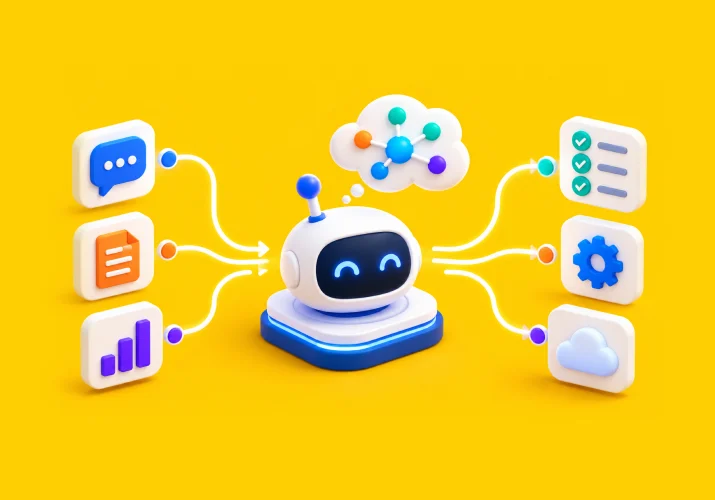
Most AI tools stop when they give you an answer. An intelligent agent is designed to take the next step.
It can understand a goal, work with available information, choose an action, use connected tools, and continue through a task. It can also stop when the situation requires human input.
Consider an employee service request. While a chatbot can explain a policy, an intelligent agent can find the employee’s details, check the relevant policy, start the required process, update the appropriate system, and escalate the request when needed.
That is where the enterprise value begins. The agent isn’t just producing information. It is helping complete a business task.
The required level of intelligence can still vary by workflow. Some tasks need fixed rules. Others need goals, trade-offs, or learning. The agent architecture should match the work it is expected to handle.
In this blog, we will look at the five main types of intelligent agents, compare them with chatbots and RPA, explain how agents connect with enterprise systems, explore practical business use cases, and lay out a 90-day path from use-case selection to production.
Intelligent Agents vs Chatbots vs RPA: What’s the Difference?
These technologies (Intelligent agents, Chatbots, and RPA ‘Robotic Process Automation’) can work together, but they solve different problems.
| Intelligent Agent | Chatbot | RPA | |
|---|---|---|---|
| Primary role | Works toward a goal and takes actions | Handles conversations and questions | Automates predefined tasks |
| Decision-making | Can interpret context and choose next steps | Mainly responds to user input | Follows fixed rules |
| Adaptability | Can respond to changing conditions | Adapts within its available context | Usually needs workflow changes |
| System interaction | Can use APIs, tools, and enterprise systems | Often focused on conversation | Uses predefined application steps |
| Best fit | Dynamic, multi-step work | Information and support | Predictable, repetitive processes |
The practical difference appears when the workflow changes.
A chatbot is useful when the user mainly needs an answer. RPA is useful when the same sequence happens again and again.
An intelligent agent fits a different kind of process. It may need to interpret a request, collect information, choose between actions, check the result, and decide what should happen next.
The three approaches can also sit in the same solution. An agent can make the decision. RPA can handle a fixed task. APIs can connect both to enterprise systems.
So the starting point should be the workflow that needs to be improved.
The Five Types of Intelligent Agents You Need to Know
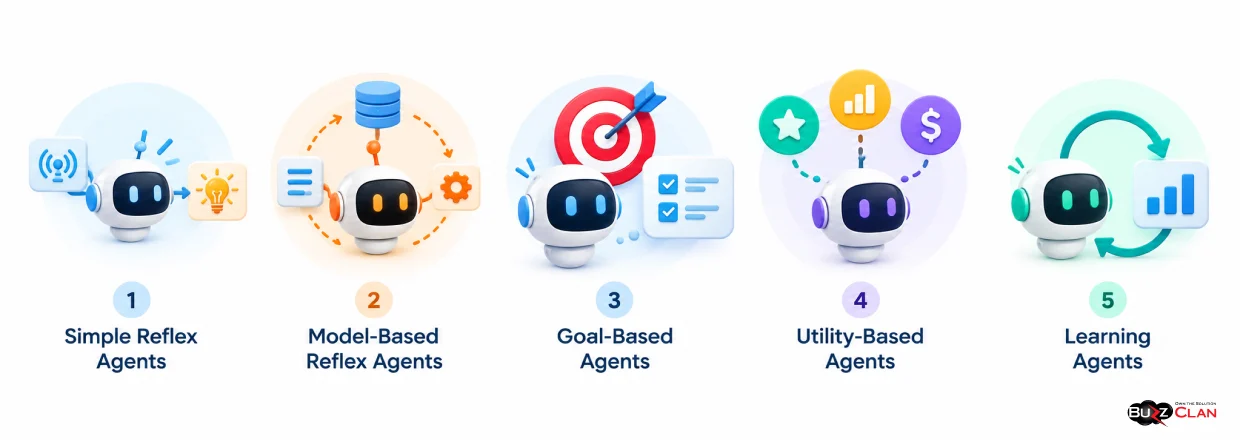
Before choosing an architecture, it helps to understand the main types of agents. The classic classification includes simple reflex, model-based reflex, goal-based, utility-based, and learning agents.
1. Simple Reflex Agents
A simple reflex agent responds to the condition it sees at that moment.
It follows predefined rules. When a specific condition occurs, it performs the related action.
This works well for predictable processes. For example, an agent can detect a defined system condition and trigger a fixed response.
The model is easy to control. It becomes less useful when the task depends on past events or requires several possible actions.
2. Model-Based Reflex Agents
A model-based reflex agent maintains an internal view of its environment. It can use previous information when deciding what to do next.
That added context helps when the current input does not tell the whole story.
An operations agent, for example, may need to consider the current service state and earlier events before deciding whether to continue, retry, or escalate an incident.
3. Goal-Based Agents
A goal-based agent works toward a defined outcome.
It considers possible actions based on whether they help achieve that outcome.
This fits processes where the result is clear but the steps can vary.
An onboarding agent may need to collect information, check completion status, start tasks, and determine the next step until the onboarding process is complete.
4. Utility-Based Agents
Some workflows have more than one acceptable outcome. The challenge is deciding which option is preferable.
A utility-based agent evaluates possible actions based on the value of their outcomes.
This can help when a process needs to balance factors such as cost, time, availability, or service quality.
5. Learning Agents
Learning agents improve their behavior through experience and feedback.
They are useful when the environment changes and fixed rules are no longer enough.
A recommendation system is a simple example. It can use past feedback to improve future recommendations.
For enterprise use, learning still needs boundaries. Teams need to decide what the agent can learn from, what it can change, and where human review is required.
These five types are best treated as design approaches, not rigid product categories. A modern agent can combine more than one approach based on the task.
How Intelligent Agents Connect to Enterprise Systems
An intelligent agent becomes much more useful when it can work with the systems that already run the business.
Those systems may include CRM platforms, ERP systems, ticketing tools, databases, knowledge repositories, workflow platforms, and custom applications.
Agents can interact with these systems through APIs, tools, search services, and other controlled integration methods. BuzzClan, for example, describes agent integrations with platforms such as ServiceNow, Salesforce, Oracle, and custom APIs.
But connecting the systems is only part of the design. The agent also needs clearly defined permissions.
- Identity controls determine who or what the agent can act as.
- Permissions determine what it can access.
- Data controls determine what information it can use.
- Business rules determine what actions it can take.
- Exception handling determines what happens when the expected path fails.
- Human escalation determines when the agent must stop and involve a person.
- Auditability creates a record of the actions taken.
A typical workflow might look like this:
Request → Understand → Retrieve information → Decide → Take action → Check result → Continue or escalate → Complete
For example, a service agent could receive a request, retrieve account information, check an order record, apply the right business rule, update the system of record, and escalate the case when the required decision falls outside its permissions.
This is why enterprise agent deployment involves more than choosing a model. The AI, data, systems, identity, workflow, and controls all need to work together.
Agentic AI in Business: Real-World Applications Driving Results
The strongest agent use cases usually begin with a workflow problem.
The question is not where AI can be inserted. It is where an agent can remove unnecessary work while still operating within clear business rules.
Customer Service
A customer service agent can do more than answer common questions. It can retrieve account information, process requests, and escalate cases with the relevant context.
BuzzClan describes customer-facing agents that connect with enterprise systems and take actions across customer workflows.
IT and Service Operations
An IT agent can receive a request, gather the information needed to understand it, work with a service platform, and determine whether the issue can be resolved or needs human attention.
The key is coordinating these steps. The agent becomes part of the service workflow.
Employee Services
Employee processes often involve policies, forms, approvals, and several internal systems.
An intelligent agent can help employees find the right information and move an approved request to its next step.
That removes manual navigation that often slows these processes down.
Knowledge Management
Enterprise information rarely sits in one place. It can be spread across documents, policies, websites, FAQs, and internal repositories.
A knowledge agent can bring these sources into one conversational experience. The agent still needs clear source controls so that its answers remain grounded in approved information.
Workflow Automation
Some business processes cross several systems and involve multiple decision points.
An agent can pull information from different sources, apply business rules, route decisions, and update systems of record. BuzzClan describes this type of multi-system agentic workflow automation across finance, compliance, operations, and HR use cases.
Across these examples, the strongest candidates share a few traits: a clear objective, relevant data, defined actions, and a clear boundary for human involvement.
From Concept to Practice: How Askora Works as an Enterprise AI Agent
One example of these principles in practice is Askora, BuzzClan’s Enterprise AI Knowledge Agent. It helps users find answers in approved organizational knowledge while giving organizations control over what the agent can access and use.
Askora first performs a scope check to determine whether a question falls within the approved business context. It then uses hybrid retrieval, combining semantic and keyword search to find relevant information.
Before returning an answer, Askora validates confidence and verifies sources. When reliable information is lacking, it can decline to answer rather than generate an unsupported response.
Depending on the deployment tier, Askora also supports role-based access controls, SSO and identity integration, API integrations, multiple knowledge sources, and custom AI workflows.
This shows how an enterprise agent can be designed around trusted information, controlled access, and clear business boundaries rather than functioning as a general-purpose AI chatbot.
Turn an Enterprise Workflow Into an AI Agent
Design and deploy AI agents around your real business processes, systems, and goals. From customer interactions to complex workflows, build agents that can reason, act, and work within defined boundaries.
Getting Started: A 90-Day Plan
A successful agent project usually starts with the workflow, not the model.
A 90-day plan gives teams a practical path from identifying the right use case to testing and launching it in a controlled environment.
Days 1–30: Select the Workflow
Start with one business process.
Choose a workflow with a clear outcome. Look for work that involves information gathering, repeated decisions, or coordination across systems.
Then map how the work happens today.
Define:
- The business goal
- The information required
- The systems involved
- The decisions the agent must make
- The points that require human approval
- The expected result
These decisions establish the agent’s boundaries before development starts.
Days 31–60: Build and Test
Connect the agent to the approved systems and data sources.
Then test the process under realistic conditions.
Use incomplete information. Try unexpected requests. Test failed integrations. Check permission limits. Test escalation rules.
The goal is not only to prove that the ideal workflow works.
It is to find out where the agent should act, where it should stop, and how it should respond when the workflow changes.
Monitoring, access controls, logging, and escalation should be built into the solution during this phase.
Days 61–90: Launch and Measure
Move the tested workflow into a controlled production environment.
Then measure the outcomes that matter to the business.
These may include processing time, manual effort, completion rates, escalation volume, response quality, or user adoption.
Use those results to decide what comes next.
A workflow may be ready for greater autonomy. Another may need better integrations or stronger human oversight.
The 90-day plan should therefore produce more than a working agent. It should give the business evidence for the next AI investment decision.
Conclusion
An intelligent agent is not simply a chatbot with a new interface.
It is designed to work toward an objective, use information and tools, make decisions within defined limits, and move a task forward.
That makes the business workflow the right starting point.
Choose a process with a clear outcome. Define what the agent can access and do. Connect the required systems. Test real conditions. Then measure what changed.
From there, the organization can decide where more autonomy makes sense.
The aim is not to automate everything. It is to give the right workflows an intelligent agent that can do useful work while remaining controlled, observable, and accountable.
Have a Workflow That Could Run Smarter?
Bring your workflow, systems, and business objectives to the conversation. Explore where an intelligent agent can fit and what it would take to move from an idea to a working solution.
Frequently Asked Questions
A chatbot mainly handles conversation. RPA automates predefined, repetitive tasks. An intelligent agent can understand a goal, assess context, use tools, and decide what to do next.
Agents can use APIs, databases, search systems, workflow tools, identity services, and other approved integrations. Access and permissions should define what the agent can retrieve and change.
The five commonly recognized types are simple reflex, model-based reflex, goal-based, utility-based, and learning agents. They differ in how they use rules, state, goals, utility, and learning.
Key concerns include excessive permissions, inappropriate data access, incorrect actions, weak exception handling, and insufficient human oversight. The risk depends on the agent’s access and level of autonomy.
An intelligent agent is better suited to workflows with variable inputs, changing conditions, or contextual decisions. RPA is often a better fit for structured processes with stable rules.
BuzzClan provides agentic AI development services for enterprise workflows. Its published capabilities include customer service agents, workflow automation, enterprise integrations, and AI systems that work with platforms such as ServiceNow, Salesforce, Oracle, and custom APIs.
Yes. BuzzClan describes integrations with enterprise platforms and custom APIs as part of its agentic AI development services.
Askora is BuzzClan’s Enterprise AI Knowledge Agent. It answers questions using approved organizational knowledge and keeps responses within defined business boundaries.
Askora checks the scope of a question, retrieves relevant content through hybrid search, validates confidence, and verifies sources before returning an answer. It can also decline when sufficient evidence is not available.
Yes. Depending on the deployment tier, Askora supports role-based access controls, SSO and identity integration, API integrations, multiple knowledge sources, and custom AI workflows.
BuzzClan’s published services cover use cases such as customer service, digital self-service, customer onboarding, and complex multi-system workflow automation.
Yes. BuzzClan’s workflow guidance starts with the business process and evaluates its value, technical feasibility, required integrations, permissions, and level of autonomy before implementation.
Yes. BuzzClan’s published services include monitoring, retraining, prompt tuning, and performance optimization for production AI agents.

Get In Touch

Table of Contents
- Intelligent Agents vs Chatbots vs RPA: What’s the Difference?
- The Five Types of Intelligent Agents You Need to Know
- How Intelligent Agents Connect to Enterprise Systems
- Agentic AI in Business: Real-World Applications Driving Results
- From Concept to Practice: How Askora Works as an Enterprise AI Agent
- Getting Started: A 90-Day Plan
- Conclusion
- Frequently Asked Questions