What is Serverless Computing and How to Use It Right for Your Business?
Gururaj Singh
May 2, 2025
Introduction
Most businesses don’t want to be in the infrastructure business. They want to build products, ship features, and serve customers. But between managing servers, planning capacity, and handling unexpected outages, a huge chunk of engineering time gets swallowed up by work that has nothing to do with the actual product.
Serverless computing fixes that.
This guide is for business leaders, product managers, and technical decision-makers evaluating serverless as a strategic move. It goes beyond the basics to unpack where serverless creates real business value, whether that’s faster releases, reduced operational overhead, or more efficient scaling.
At the same time, it takes a clear-eyed look at the limitations, so you can make an informed decision about where it truly fits, and where it doesn’t.
What is Serverless Computing?
Serverless computing is a cloud model where you can write and run code without worrying about servers. You don’t have to set them up, manage them, or scale them. The cloud provider takes care of all of that for you.
You simply deploy your code, and it runs when needed. You’re only charged for the time your code actually runs—often measured in milliseconds.
Servers still exist in the background. The difference is that you don’t see them, manage them, or pay for unused capacity. That’s what sets serverless apart from traditional cloud computing.
Serverless is no longer a niche approach. According to Datadog’s 2025 report, it’s widely adopted across major cloud platforms, showing that it has become a core part of modern infrastructure, not just an experiment.
This makes it a strong fit for businesses that want to move faster, reduce operational effort, and align infrastructure costs with actual usage.
How Does Serverless Computing Work?
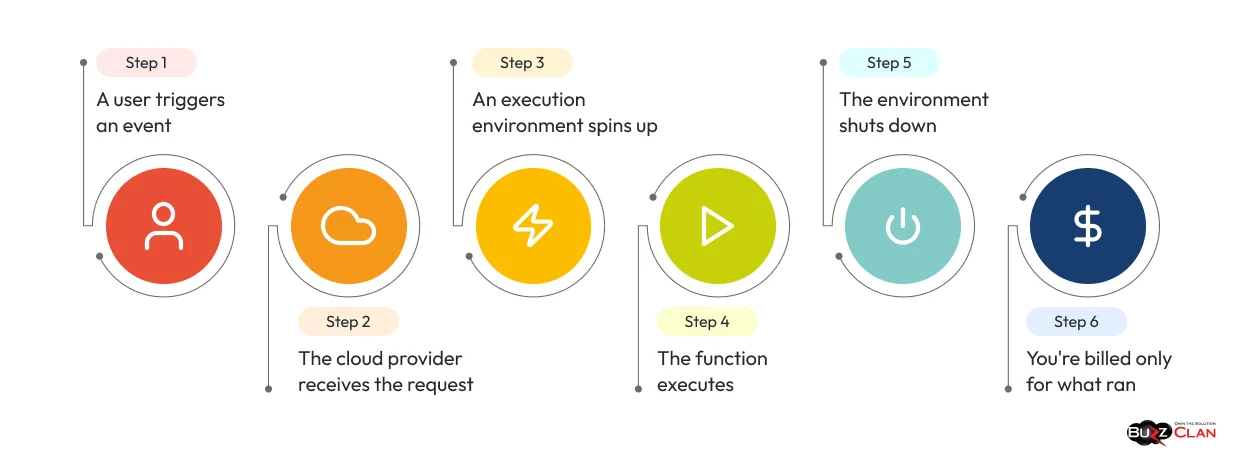
Understanding serverless becomes much simpler when you look at it step by step. Here’s what happens from the moment a user takes an action to when your code runs and completes.
Step 1: A user triggers an event
Everything starts with an action. A user clicks a button, uploads a file, submits a form, or calls an API. This action becomes an event – the signal that tells your serverless function to wake up and do its job.
Step 2: The cloud provider receives the request
The request is picked up by your cloud provider and sent to the appropriate function. Everything happens automatically, with no human involvement and no waiting for servers to be ready.
Step 3: An execution environment spins up
The cloud provider creates a small, isolated environment for your function to run. This happens in milliseconds. If thousands of users trigger the function at the same time, the system automatically creates separate environments for each request and runs them in parallel without any manual effort.
Step 4: The function executes
Your function runs and performs a single task, resizing an image, validating a payment, or sending a notification. Each execution is independent. It doesn’t retain information from previous requests or interact with other functions running at the same time.
Step 5: The environment shuts down
Once the function finishes, the execution environment is destroyed. You’re not paying for idle time. You’re not holding onto resources you don’t need. The whole cycle, from trigger to shutdown, typically completes in under a second.
Step 6: You’re billed only for what ran
The cloud provider measures the exact time your function runs, often in milliseconds, and charges you only for that duration. Nothing more.
Think of it like a motion-sensor light. Traditional servers are like leaving the lights on all day just in case someone walks in. Serverless turns the lights on only when needed and switches them off as soon as the job is done. You pay only for the time the light is actually on.
This is a significant shift from traditional cloud infrastructure, where teams often spend hours configuring scaling rules, choosing instance types, and setting up load balancers before they can even focus on building the actual product.
What is a Serverless Architecture?
Serverless architecture is a way of building applications using managed cloud services and event-driven functions. You don’t have to manage or maintain servers yourself.
Instead of running one large application on a single server, the system is broken down into smaller, independent functions. Each function handles a specific task and scales automatically as needed.
These functions work alongside managed services like databases, storage, and APIs, which are also handled by the cloud provider.
A practical example: An e-commerce application built on serverless architecture might use an API gateway to receive orders, a function to validate payments, a backend service for user authentication, another function to update inventory, and a managed database for storage.
Each component handles a specific task, working together as part of the overall system. None of them requires your team to manage, patch, or scale servers manually.
This approach becomes even more effective when combined with a broader cloud strategy. Serverless is well-suited for event-driven and variable workloads, while other components handle more consistent or long-running tasks.
Components of Serverless Architecture
Understanding these components makes it easier to see how a serverless system works in practice. Each piece plays a specific role, coming together to handle requests, run code, and manage scaling automatically.
Function as a Service (FaaS)
FaaS is the core execution layer. You write a function, upload it, and the platform runs it when triggered. AWS Lambda, Google Cloud Functions, and Azure Functions are the three most widely adopted FaaS platforms as of 2025. According to the Serverless Framework’s State of the Serverless Community survey, AWS Lambda leads adoption by a significant margin, with the Serverless Framework itself being used by 67% of developers building serverless architectures.
Event Triggers
These are the signals that tell a function when to run. A file upload to cloud storage, an incoming HTTP request, a message arriving in a queue, a scheduled timer – any of these can fire a function. No trigger means no execution, which is exactly what keeps costs down.
API Gateway
When an external request comes in, the API gateway receives it and routes it to the correct function. It handles rate limiting, authentication checks, and request transformation before the function even sees the data. It’s the front door of a serverless application.
Backend-as-a-Service (BaaS)
BaaS products handle the infrastructure your application needs without you building or managing it. Authentication (AWS Cognito, Firebase Auth), databases (DynamoDB, Firestore), and file storage (S3, Google Cloud Storage) are all examples. Combined with serverless functions, BaaS lets small teams build full applications without a dedicated infrastructure team.
Serverless Orchestration
When a workflow requires multiple functions to run in a specific order or in parallel, orchestration tools coordinate them. AWS Step Functions is the most widely used example. Without orchestration, complex multi-step workflows become difficult to manage and debug.
Monitoring and Logging
Serverless functions run for very short durations, making them harder to track with traditional monitoring tools. Platforms like AWS CloudWatch provide visibility into performance, errors, and execution times at the function level. Good observability is essential in serverless environments. Without it, debugging production issues becomes difficult.
CI/CD Pipelines
DevOps pipelines automate the testing and deployment of serverless functions. Developers push code; the pipeline runs tests, packages the function, and deploys it. This keeps deployments fast and consistent, which matters when you’re shipping dozens of functions independently.
Why Businesses Are Moving to Serverless
At its core, the shift to serverless is about moving faster, reducing operational complexity, and paying only for what is actually used. Here are some of the key reasons behind this shift:
Lower Infrastructure Costs
With traditional cloud deployment models, you often pay for capacity even when it’s not being used. Serverless changes that by charging only when your code runs.
This makes a big difference for workloads with unpredictable traffic, such as seasonal e-commerce, notification systems, or event-driven data pipelines, where usage can spike and drop quickly.
Faster Time to Production
Teams that once spent weeks setting up and configuring infrastructure can now move from idea to deployed code in days. Developers are no longer blocked by server provisioning. They can write a function and deploy it immediately.
This shortens the cycle between an idea and a working product, giving teams a clear advantage when speed matters.
Automatic Scaling
A sudden traffic spike won’t take your application down. Serverless platforms scale instantly, from zero requests to millions, without any configuration change from your team. This is the architecture behind many consumer apps that need to handle unpredictable demand without over-provisioning.
Reduced Operational Overhead
Engineering teams spend far less time managing infrastructure. There’s no need to handle patches, plan capacity, or deal with routine server maintenance.
With the cloud management handled by the provider, teams can focus on building and improving the product.
Key Insight: Serverless doesn’t eliminate infrastructure decisions. It shifts them from your team to the cloud provider. This is a fundamental change in how systems are managed.
Is your infrastructure costing more than it should?
BuzzClan helps businesses adopt serverless with the right cost structure, architecture, and clarity — so you can scale efficiently without unnecessary overhead.
How to Choose the Right Serverless Approach
Not every application is a good candidate for serverless. Before committing, three questions cut through the noise.
Is the workload event-driven?
Serverless works best when code runs in response to an event such as an API request, a file upload, a database update, or a scheduled task.
It’s not ideal for long-running processes that need continuous execution or persistent connections, such as video encoding, real-time gaming servers, or large batch jobs. Most platforms also have execution time limits (for example, AWS Lambda has a 15-minute limit), which can restrict these use cases.
Is traffic unpredictable or variable?
Serverless is a good fit when traffic goes up and down. You only pay when your code runs, so costs naturally adjust with demand.
If your traffic is steady and predictable, other options like reserved instances or containers can be more cost-effective. At consistently high volumes, the cost per request in serverless can add up quickly. It’s important to estimate and compare costs before making a decision. Proactive cloud cost planning can help avoid unexpected expenses later.
Does your team have proper observability tooling?
Distributed, short-lived functions are harder to debug than a monolithic application. Good structured logging, distributed tracing, and alerting need to be in place before critical workloads go live in a serverless environment. Teams that skip this step find production debugging significantly harder than expected.
If all three answers are yes, serverless is likely a strong fit. If not, a hybrid approach is often more practical, using serverless for event-driven components and containers or VMs for services that need to run continuously.
Which Serverless Platform is Right for You?
Each major serverless platform has its own strengths. The right choice usually depends on the cloud environment you’re already using.
| Platform | Best For | Key Strength | Max Execution Time |
|---|---|---|---|
| AWS Lambda | Teams already on AWS | Widest ecosystem, 200+ service integrations | 15 minutes |
| Azure Functions | Microsoft/enterprise shops | Deep Azure DevOps and Office 365 integration | 10 minutes (Consumption) |
| Google Cloud Functions | GCP-native teams, ML workloads | Strong Pub/Sub and BigQuery integration | 60 minutes |
| Cloudflare Workers | Edge computing, global low-latency apps | Sub-millisecond cold starts at the edge | 30 seconds (CPU time) |
| Vercel Functions | Frontend-first development teams | Easiest developer experience, framework-native | 60 seconds |
Best Serverless Hosting Platforms and Frameworks for Frontend Applications
For frontend teams, Vercel and Netlify are the most developer-friendly options. They deploy globally by default, support Next.js, Nuxt, SvelteKit, and other major frameworks out of the box, and abstract nearly all infrastructure configuration. For teams that need more control over backend logic alongside their frontend, AWS Amplify bridges the gap between FaaS and a managed frontend experience.
Top Frameworks for Building Serverless Applications:
- Serverless Framework — Cloud-agnostic; works across AWS, Azure, and GCP. According to the Serverless Framework community survey, 76% of developers building serverless architectures use it.
- AWS SAM (Serverless Application Model) — Best for teams building deeply within the AWS ecosystem. Native support for Lambda, API Gateway, and DynamoDB.
- SST (Serverless Stack) — Strong choice for full-stack TypeScript applications. Active community and good developer experience.
- Pulumi — Infrastructure as code with serverless support. Works well for teams that want programmatic infrastructure management.
- Terraform — Not serverless-specific, but widely used for infrastructure as code across any cloud provider.
Best Practices for Successful Serverless Implementation

Getting these right from day one saves a lot of pain later.
Keep functions small and focused
One function should do one job. The moment a function starts handling three different concerns, it becomes harder to test, scale independently, and debug when something breaks. If a function is approaching 500 lines of code, it’s probably doing too much.
Set execution timeouts deliberately
Every platform has a maximum runtime. Know your limits and design for them. Functions that consistently approach the timeout are a signal that the workload doesn’t belong in serverless.
Use environment variables and a secrets manager
Never hardcode API keys, database connection strings, or credentials inside function code. Use environment variables for configuration and a secrets manager like AWS Secrets Manager or HashiCorp Vault for sensitive values.
Design for idempotency
Serverless functions can be invoked more than once for the same event, especially in retry scenarios. An idempotent function produces the same result whether it runs once or five times with the same input. Not designing for this leads to subtle, hard-to-trace data-consistency bugs.
Plan for cold starts
A cold start happens when a function hasn’t been called recently and the platform needs time to initialize a new execution environment. According to AWS Lambda documentation, this delay can range from under 100ms for lightweight runtimes to several seconds for heavier ones like Java. Keep function packages lean and use provisioned concurrency for latency-sensitive endpoints.
Test locally before deploying
Tools like AWS SAM CLI and the Serverless Framework’s local invoke feature simulate function execution on your machine. Making local testing a consistent habit catches most bugs before they reach production.
Pros and Cons of Serverless Computing
No honest evaluation skips this part.
Pros
- No server management: Your team never touches infrastructure below the function level. The provider handles OS updates, hardware failures, and capacity planning.
- Pay-per-use pricing: You pay for actual compute time. Idle resources cost nothing. For variable workloads, this is a material cost advantage over paying for reserved capacity.
- Instant scalability: Traffic spikes are handled automatically. No pre-scaling, no manual intervention, no configuration changes.
- Faster deployment cycles: Updating a function takes minutes. Shipping a new feature doesn’t require a server deployment pipeline.
- Built-in high availability: Most providers run functions across multiple availability zones by default, with no additional configuration.
Cons
- Cold start latency: Functions that haven’t run recently take longer to initialize. For user-facing endpoints where response time matters, this is a real problem, not a theoretical one.
- Vendor lock-in: Heavy use of a provider’s specific triggers, integrations, and managed services makes switching platforms later expensive and time-consuming. Vendor lock-in deserves serious consideration in long-term architecture decisions.
- Harder debugging: Distributed, short-lived functions are more difficult to trace than a monolithic application. Without good observability, finding the source of a production issue can take hours instead of minutes.
- Execution time limits: Some workloads simply don’t fit within the time constraints serverless platforms impose.
- Unpredictable costs at scale: At very high, consistent request volumes, per-invocation pricing can exceed the cost of reserved instances. This surprises teams that didn’t model costs before migrating. Cloud cost optimization planning before migration is not optional.
Want help assessing your serverless readiness?
BuzzClan’s cloud team works with businesses to evaluate, design, and implement serverless architectures that hold up in production.
DevOps Integration in Serverless Computing
DevSecOps practices don’t disappear in a serverless environment. They shift focus.
Since your team isn’t managing servers, the attention moves entirely to code quality, deployment automation, and observability. CI/CD pipelines become the backbone of how serverless applications get built and maintained reliably.
Impact on DevOps and CI/CD pipelines
In traditional deployments, you push code to servers. In serverless, each function is its own deployable unit. A well-structured pipeline packages each function independently, runs its tests, and deploys only what passes. A fintech company using Azure Functions, for example, can configure its pipeline so that every commit triggers an automated test suite, and only passing builds get deployed to production — with no human approval needed for standard updates.
Infrastructure-as-code tools like AWS SAM, Terraform, and Pulumi define your entire serverless infrastructure in version-controlled files. Every environment — development, staging, production — is reproducible and consistent. This eliminates the “it works on my machine” class of deployment failures.
Best practices for serverless CI/CD
Start with automated testing at the function level. Unit tests, integration tests, and end-to-end tests should all run in the pipeline before any code reaches production. Add automated dependency vulnerability scanning. Use staged rollout strategies — canary or blue-green deployments — so a bad update affects only a fraction of traffic before being fully promoted or rolled back.
Migration Strategies for Serverless Adoption
Two approaches work well in practice:
Rebuilding
Identify which components of your existing application map cleanly to event-driven functions and rewrite those parts specifically for serverless. Keep the rest of the system intact until the team has enough experience to tackle it.
Lift-and-shift
Move workloads to the cloud with minimal changes first, then optimize for serverless over time. A travel booking company migrating to serverless might start by moving its customer-facing booking flow to Lambda functions, leaving back-end processing on traditional servers for a later phase.
Most successful cloud migrations start with lower-risk, non-critical workloads to build team confidence before touching core systems. For teams new to serverless, the 7Rs of cloud migration framework provides a useful starting point for deciding which workloads to move and how.
Security in Serverless Architecture
Security in serverless is a different problem than security in traditional environments. The network perimeter matters less. The code and its permissions matter much more.
What is Serverless Security?
Serverless security is the practice of protecting cloud functions, their execution environments, and the data they process through access control, input validation, dependency management, and runtime monitoring rather than through traditional network-level defenses, such as firewalls and intrusion detection systems.
Because the cloud provider manages the infrastructure layer, your security responsibility shifts almost entirely to the application layer.
Is Serverless Architecture Secure?
It can be. But the attack surface changes rather than shrinks. Traditional risks like exposed SSH ports and unpatched operating systems disappear. New risks appear in their place: over-permissioned functions, unvalidated event inputs, insecure third-party dependencies, and inadequate monitoring of short-lived executions.
Serverless Security Risks
- Inadequate monitoring: Short-lived functions are harder to track with traditional tools. Suspicious API calls and anomalous execution patterns can go undetected longer than they would on a persistent server. SIEM platforms and purpose-built serverless monitoring tools address this gap.
- Event injection: HTTP requests and storage events trigger functions. If those inputs aren’t validated before processing, attackers can inject malicious payloads through the trigger itself. This is one of the most common serverless attack vectors, as documented by OWASP’s serverless security guidance.
- Over-permissioned functions: Giving a function admin-level cloud access because it’s easier than thinking through the right permissions is one of the most common and consequential mistakes in serverless deployments.
- Insecure dependencies: Functions often import third-party libraries. Vulnerabilities in those libraries become your vulnerabilities. Automated dependency scanning should run in every deployment pipeline.
- Abuse of auto-scaling: Attackers can deliberately trigger mass function invocations to degrade performance or run up costs. Rate limiting and request authentication are necessary defenses.
Serverless Security Best Practices
- Apply least-privilege IAM policies to every function. Each function should access only what it needs. Regular permission audits keep this from drifting over time.
- Validate all inputs before a function processes them. Treat every incoming event as untrusted data.
- Use structured logging and real-time alerting across all functions. Third-party observability tools give better visibility than native logging alone for complex distributed systems.
- Encrypt data at rest and in transit. Use runtime protection tools capable of detecting threats during execution.
- Run regular penetration testing on serverless applications. Simulated attacks surface weaknesses that automated scanning misses.
Zero-trust architecture principles map directly onto serverless security. Every function call should be authenticated and authorized. Every input should be validated. Every access should be logged. The cybersecurity fundamentals that apply to traditional environments apply here too — they just need to be implemented at the function level rather than the network level.
Conclusion
Serverless computing works exceptionally well for specific problems: event-driven workloads, variable traffic, rapid deployment cycles, and teams that want to focus on building rather than maintaining infrastructure.
The businesses getting the most value from serverless aren’t the ones that moved everything at once. They’re the ones who identified the right workloads, built observability in from day one, treated security as part of the design rather than an afterthought, and modeled their costs before committing.
If you’re evaluating serverless seriously, the right first step is an honest audit of what you’re currently running and where your engineering team’s time actually goes. That usually makes the right path clear.
FAQ
Serverless computing is a cloud execution model where developers write and deploy code without managing any server infrastructure. The cloud provider automatically handles provisioning, scaling, and availability. Businesses pay only for the actual compute time their code uses, billed in milliseconds, making it cost-efficient for variable or event-driven workloads.
There is no single best provider. According to Datadog’s 2025 State of Containers and Serverless report, AWS Lambda leads with 65% adoption among AWS customers, Google Cloud Run reaches 70% of GCP customers, and Azure App Service covers 56% of Azure users. The right platform depends on your existing cloud environment, team experience, and the specific workloads you’re moving.
The Serverless Framework is the most cloud-agnostic option, used by 76% of developers building serverless architectures according to the Serverless Framework’s own community survey. AWS SAM is the standard for deep AWS integration. SST works well for full-stack TypeScript applications. For frontend-focused teams, Vercel and Netlify offer the most streamlined developer experience with minimal configuration needed.
Yes, when implemented correctly. Serverless shifts security responsibility from the infrastructure layer to the application layer. The main risks are over-permissioned functions, unvalidated inputs, insecure dependencies, and inadequate monitoring. Applying least-privilege IAM policies, validating all event inputs, scanning dependencies automatically, and using structured logging from the start addresses most of these risks.
Serverless works well for API backends, image and video processing pipelines, real-time notification systems, scheduled data jobs, e-commerce order processing, authentication flows, and event-driven data pipelines. Any workload that runs in response to events, has variable or unpredictable traffic, and doesn’t need to run constantly is a strong serverless candidate.
Containers package an application and its dependencies and run on managed or self-managed infrastructure. Serverless abstracts further: you write individual functions, and the platform manages containers, scaling, and execution automatically. Containers give more control and suit long-running workloads. Serverless reduces operational overhead and suits short-lived event-driven tasks. Many teams use both together.
AWS Lambda offers pay-per-millisecond billing, automatic scaling to zero, integration with over 200 AWS services, and a maximum execution time of 15 minutes per invocation. Combined with AWS API Gateway, Step Functions, and EventBridge, Lambda enables complex event-driven applications without a single server for the team to manage.
The main disadvantages are cold start latency, harder distributed debugging, vendor lock-in risk, execution time limits, and potentially higher costs at very high, steady request volumes. These are real trade-offs. Understanding them before migration helps you design around them rather than discover them in production.
Two approaches work in practice. Rebuilding means rewriting specific application components as serverless functions, suited for teams ready to optimize from the start. Lift-and-shift moves existing workloads with minimal changes, then optimizes over time. Starting with non-critical, lower-risk workloads builds team confidence before tackling core systems.

Get In Touch
Follow Us