
What Is MCP? The Complete Guide to Enterprise AI Integration
Abhi Garg
Oct 30, 2026
An enterprise AI assistant can summarize a customer record or answer questions about company policies. But what happens when it needs to retrieve the latest order status, update a CRM record, or create a ServiceNow ticket?
Without the right integration, the AI may lack access to the data or actions it needs. Teams must then build and maintain separate connections between AI applications and business systems.
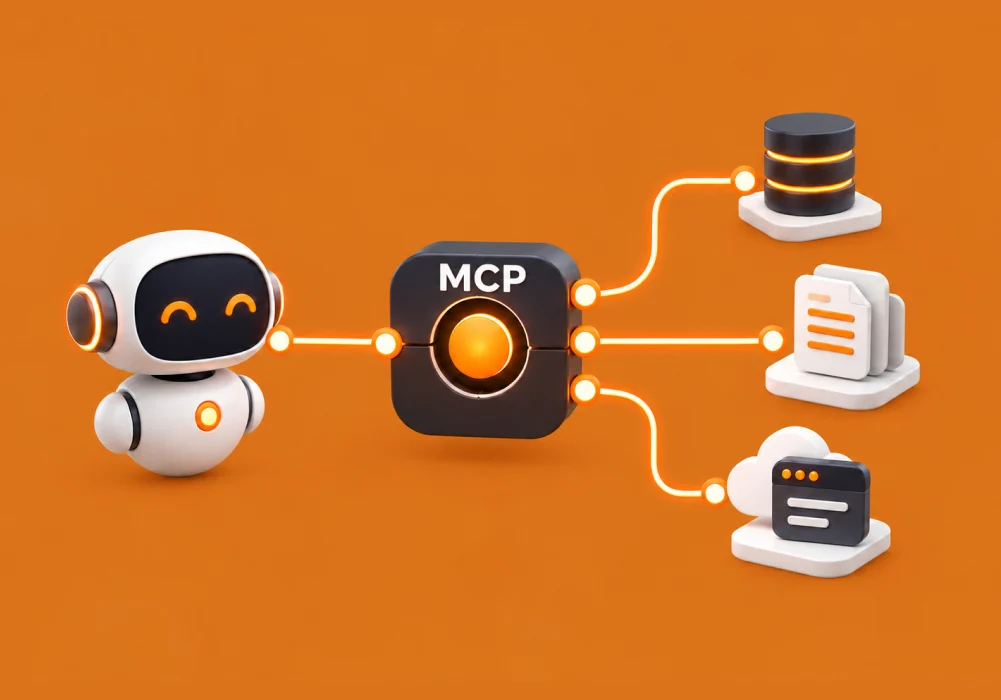
The Model Context Protocol (MCP) provides a standard way for AI applications to connect with external tools and data. It lets compatible AI clients discover and use capabilities exposed by MCP servers that connect to existing APIs, databases, and enterprise applications.
For businesses, MCP lets you build more connected AI workflows without creating a separate AI-facing integration for every client. However, it does not automatically make every system compatible or secure. Proper access controls, reliable data, and clear action boundaries remain essential.
In this blog, we will explain what MCP is, how MCP servers work, and how MCP compares with APIs and retrieval-augmented generation (RAG).
What is MCP (Model Context Protocol)?
The Model Context Protocol (MCP) is an open protocol that standardizes how AI applications connect to external data sources and tools. It defines how compatible clients and servers discover capabilities, exchange information, and request supported actions.
Think of MCP as a common connection interface for AI applications. Instead of creating a different AI-facing integration for every supported client, developers can expose selected capabilities through an MCP server.
What is an MCP Server?
An MCP server is a software component that exposes selected tools, data, or prompt templates to compatible AI applications through MCP. It connects the AI-facing interface to the underlying business system.
For example, an MCP server could expose a customer lookup tool that retrieves permitted information from Salesforce through its API. The AI application can use that tool without receiving unrestricted access to the entire CRM.
MCP servers can run locally or remotely, depending on the architecture and access requirements.
How MCP is Structured
MCP uses three core components:
| Component | Role |
|---|---|
| MCP host | The AI application that coordinates the model, user interactions, and connections |
| MCP client | Communicates with a specific MCP server on behalf of the host |
| MCP server | Exposes selected capabilities from data sources and business systems |
MCP servers can expose three main capability types:
- Tools: Actions such as searching for a customer, querying a database, or creating a ticket.
- Resources: Data that provides context, such as files, records, or other information.
- Prompts: Reusable templates for common AI interactions.
These capabilities serve different purposes. Resources provide information, tools enable actions, and prompts help structure interactions. The client and server must support the relevant capabilities for them to work together.
MCP does not replace the AI model or determine how it reasons. It standardizes how compatible applications access external capabilities.
Why Enterprise AI Projects Stall Without MCP
Enterprise AI pilots often work well when they answer questions or summarize documents. Challenges emerge when they need current information or actions across several business systems.
Separate Integrations Increase Maintenance
Connecting AI to a CRM, service management platform, and knowledge base can require separate interfaces, authentication logic, and error handling.
MCP offers a common interface for compatible AI clients. Teams may be able to reuse an MCP server across supported applications, reducing duplicated integration work. Underlying system connections and maintenance are still required.
AI Lacks Business Context
Resolving a customer issue may require support history, account status, policies, and order details. When these sources remain disconnected, employees must gather the information manually.
MCP servers can expose retrieval tools and resources that let an AI application access relevant information, subject to configured permissions.
Access and Governance Become More Complex
Connecting AI to enterprise systems raises questions about data access, permitted actions, and accountability.
MCP provides a structured way to expose selected capabilities, but the protocol does not automatically enforce every security requirement. Organizations must still implement authentication, authorization, data filtering, logging, and approval policies.
MCP helps reduce integration complexity, but it does not replace enterprise architecture or security controls. Its value depends on how well you design and govern the connections.
How Does MCP Work?
MCP provides a standard way for a compatible AI application to discover and use capabilities a server exposes. The underlying business operation still runs through the connected system.
Consider an AI assistant helping an IT support team investigate a ticket.
- Discover capabilities: The MCP client connects to a server and discovers its available tools and other supported capabilities.
- Select a tool: Based on the request, the AI application determines whether it needs external information or an action.
- Validate access: The server validates the request and applies the relevant authorization rules.
- Interact with the system: The server calls the appropriate API, database service, or integration layer.
- Return the result: The server sends the result to the AI application, which uses it to answer the user or continue the workflow.
For example, the assistant could retrieve a ticket, search relevant knowledge articles, and summarize possible resolutions. If ticket updates are permitted, it could also prepare or submit an update under the configured controls.
This process depends on compatible capabilities and correct configuration. MCP does not automatically grant access to every application or authorize every action.
MCP vs APIs and RAG: What Changes for Your Business
MCP, APIs, and RAG solve different problems. Enterprises can combine them to connect AI with business information and workflows.
| Technology | Main purpose | Enterprise role |
|---|---|---|
| MCP | Standardizes how compatible AI applications discover and use capabilities | Provides a common interface for accessing tools and context |
| APIs | Let software exchange data and request operations | Connect applications, retrieve records, and perform business operations |
| RAG | Retrieves relevant information to ground AI-generated responses | Supplies context from documents, knowledge bases, and other sources |
MCP vs API
An API defines how software communicates with a particular system. For example, a CRM API may retrieve customer information or update a record.
MCP provides a common interface that compatible AI applications can use to discover and request selected capabilities. An MCP server may call the existing CRM API to perform the operation.
MCP therefore does not eliminate APIs, custom adapters, or business logic. It standardizes the AI-facing connection while existing integrations continue to connect the underlying systems.
MCP vs RAG
RAG retrieves relevant information to help an AI model produce grounded answers. It helps with questions that depend on internal policies, product documentation, or business records.
MCP can expose tools that access those retrieval services. For example, an AI assistant could use an MCP tool to search an internal knowledge base, retrieve relevant documents, and use them to answer a question.
The approaches work together:
- RAG retrieves information to ground an answer.
- MCP provides a standard interface for accessing retrieval capabilities and other tools.
- APIs and integration services connect those capabilities to business systems.
Together, they can support workflows that combine information retrieval with authorized actions. Results still depend on source quality, permissions, and how the AI uses the retrieved information.
Business Benefits and ROI Use Cases of MCP
MCP is most valuable when it connects AI to a specific business workflow that spans systems or requires access to current information.
Key Business Benefits
- Less duplicated integration work: A common interface reduces the need to build separate AI-facing connections for each supported client.
- Better business context: AI applications can retrieve relevant information from connected systems instead of relying only on user-provided context.
- Support for business actions: With appropriate tools and permissions, AI can initiate operations such as creating tickets or updating records.
- Reuse of existing systems: MCP can expose selected capabilities from established applications without requiring their replacement.
The actual benefit depends on the workflow, integration effort, data quality, and security controls.
Enterprise MCP Use Cases
| Business function | Example workflow | Potential value |
|---|---|---|
| IT service management | Retrieve tickets, search knowledge articles, and prepare updates | Less manual context gathering |
| Sales and CRM | Retrieve account history and recent interactions | Faster account preparation |
| Enterprise knowledge | Search policies and internal documentation | Easier access to organizational knowledge |
| IT operations | Retrieve alerts, deployment details, and incident records | Better context for investigations |
| Data and analytics | Access approved queries and reporting tools | Simpler access to business information |
How to Measure MCP ROI
Measure business outcomes rather than the number of servers deployed. Establish a baseline before the pilot, then track:
- Time needed to complete the workflow.
- Manual steps and handoffs eliminated.
- Task completion and error rates.
- Failed tool calls and repeated attempts.
- Employee adoption and repeated usage.
- Integration development and maintenance costs.
- Security exceptions and unauthorized access attempts.
Compare the results with implementation, infrastructure, model usage, and ongoing maintenance costs. A focused pilot with measurable goals helps determine whether MCP delivers enough value to justify further investment.
How BuzzClan Helps Enterprises Adopt MCP
MCP adoption requires more than building a server. Enterprises need to select the right use case, connect existing systems, define access boundaries, and prepare the integration for production.
BuzzClan’s published work includes an enterprise MCP server implementation guide and a Google Workspace MCP integration for AI agents. The latter describes a gateway architecture between internal AI platforms and remote MCP services.
BuzzClan’s agentic AI development services also cover enterprise integrations with systems such as ServiceNow, Salesforce, Oracle, and custom APIs.
These capabilities can support three stages of an MCP initiative.
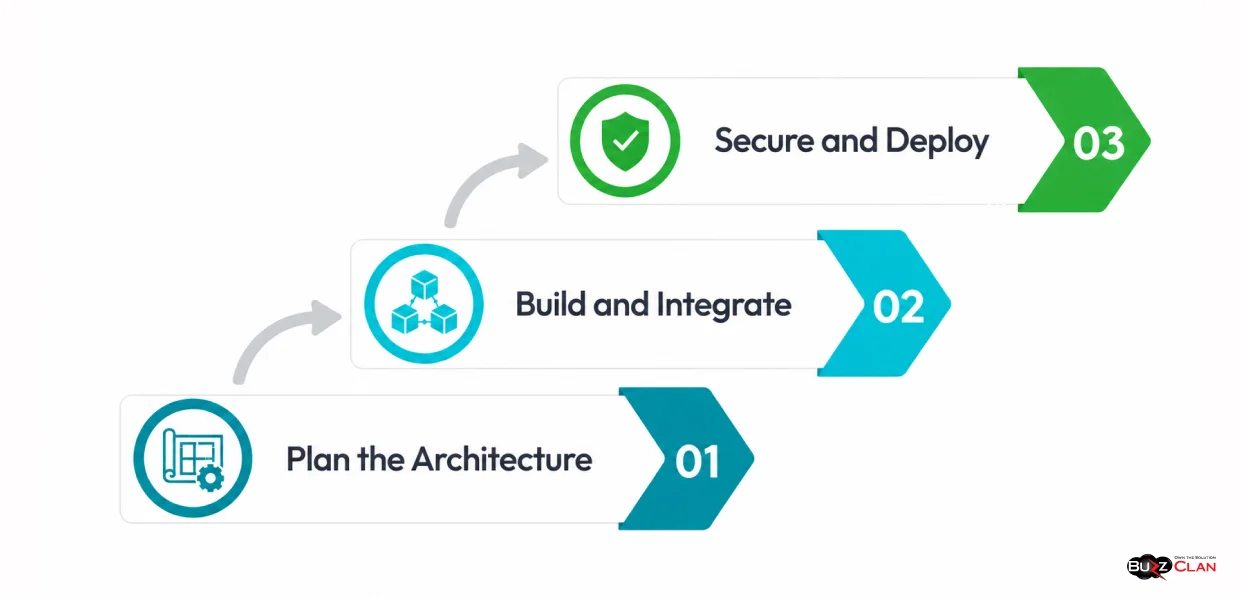
Plan the Architecture
Identify the business process, required data, connected systems, and user roles. This helps determine whether an existing MCP server is suitable or whether you need a custom implementation.
Build and Integrate
Connect selected capabilities through existing APIs, enterprise applications, knowledge services, or custom adapters. Expose only the tools and resources required for the workflow.
Secure and Deploy
Test authentication, authorization, tool inputs, data filtering, and failure handling. Add logging, monitoring, secret management, and a maintenance plan before production use.
Connect AI to Enterprise Systems with BuzzClan
The goal is to give AI access to useful enterprise capabilities without weakening the controls that protect business data and operations. BuzzClan can help assess your requirements and define an MCP integration approach around your systems, workflows, and security needs.
MCP Security Risks and How to Mitigate Them
MCP does not automatically make connected systems secure. Servers may retrieve sensitive data or trigger operations that affect business records. Security must cover both the AI-facing interface and the systems behind it.
| Risk | How to mitigate it |
|---|---|
| Excessive permissions | Apply least privilege and separate read-only tools from tools that modify or delete data. |
| Prompt injection | Treat retrieved documents and tool responses as untrusted. Do not let their instructions override security policies. |
| Untrusted or compromised servers | Vet server sources, review configurations, monitor dependencies, and maintain update procedures. |
| Credential misuse | Use approved secret management. Never expose API keys or service credentials through prompts or tool arguments. |
| Sensitive data exposure | Filter responses, restrict access, and apply appropriate masking and retention policies. |
| Unsafe or unintended actions | Validate tool inputs, enforce authorization, and require human approval for high-impact operations. |
For remote MCP servers, follow the applicable MCP authorization specification. Protected services need appropriate authentication and access-token validation. Authorization should also reflect the user’s or service’s permitted actions.
Log relevant tool calls, authorization outcomes, errors, and operational events. Test invalid inputs, expired credentials, unavailable services, permission changes, and unexpected requests before production deployment.
Security is an ongoing responsibility. Review permissions and monitor connected systems as the implementation evolves.
Is Your Enterprise Ready for MCP? A 5-Point Checklist
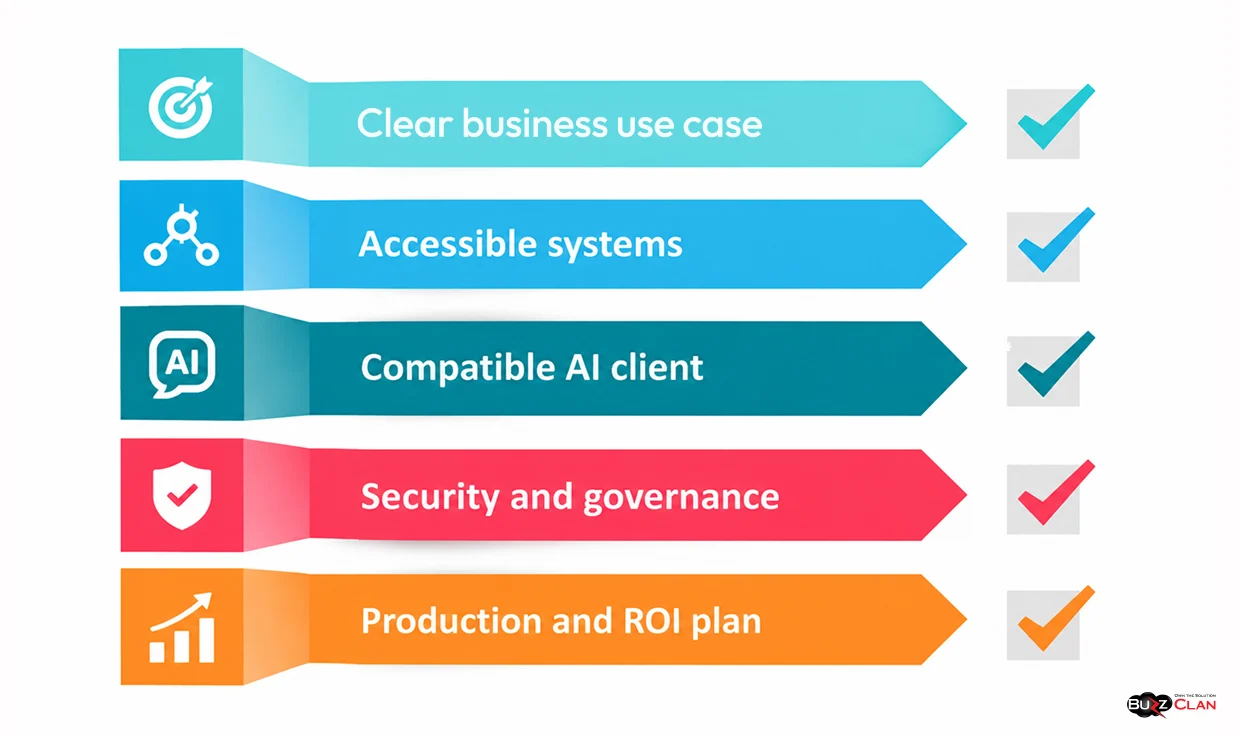
Use this checklist to assess readiness before starting an MCP pilot.
- Clear business use case: Define the workflow, business owner, intended users, and measurable success criteria.
- Accessible systems: Confirm suitable APIs, adapters, data sources, and dependencies.
- Compatible AI client: Verify support for the required MCP capabilities and transport.
- Security and governance: Define identity controls, least-privilege access, data filtering, approvals, logging, and ownership.
- Production and ROI plan: Establish testing, monitoring, maintenance, cost measurement, incident handling, and version management.
If several areas need attention, start with a limited pilot. Use the results to refine the architecture, security controls, and expected business value before connecting more systems.
Conclusion
MCP gives enterprises a standard way to expose selected tools and data to compatible AI applications. It can reduce duplicated integration work and support workflows that combine information retrieval with authorized actions.
It does not replace APIs, RAG, or enterprise security controls. APIs connect underlying systems, RAG grounds AI responses in relevant information, and MCP provides a shared interface for accessing selected capabilities.
Start with a clear business use case. Identify the required systems and permissions, test the integration, and measure its value before expanding.
With the right architecture, security, and governance, MCP can become a useful part of an enterprise AI integration strategy.
Turn Enterprise AI Connections into Real Business Outcomes
MCP creates a foundation for connecting AI with enterprise systems. BuzzClan’s agentic AI development services help businesses design and integrate AI-powered workflows that use enterprise data and tools to support practical business tasks.
Frequently Asked Questions
An MCP server exposes selected tools, data, and other capabilities to compatible AI applications. It can connect to enterprise systems through APIs or other integrations, allowing AI applications to retrieve information or request authorized actions.
An API enables software systems to exchange data and perform operations. MCP standardizes how compatible AI applications discover and access selected capabilities. An MCP server can use existing APIs to connect AI applications with business systems.
Yes. RAG retrieves relevant information to ground AI-generated responses, while MCP provides a standard interface for accessing tools and data. An MCP server can expose a knowledge retrieval service that an AI application uses as part of a RAG workflow.
MCP can support workflows across IT service management, sales, enterprise knowledge, IT operations, and data analytics. Examples include retrieving ServiceNow tickets, accessing CRM records, searching internal policies, and gathering incident information. The value depends on the workflow and integration design.
Businesses should enforce authentication, least-privilege access, input validation, and appropriate data filtering. They should also protect credentials, monitor tool activity, and require approval for sensitive actions. Regular testing and access reviews help maintain security as integrations evolve.
BuzzClan can help assess your business workflows, application architecture, and integration requirements to identify suitable MCP opportunities. This helps prioritize use cases based on business value, technical feasibility, data access, and security requirements before development begins.
BuzzClan has published guidance on MCP server development and enterprise AI integration. A custom server can expose selected tools and data from existing systems. The implementation approach depends on your application architecture, available interfaces, required capabilities, and target AI environment.
BuzzClan’s agentic AI development services cover enterprise integrations with platforms such as ServiceNow, Salesforce, Oracle, and custom APIs. BuzzClan can help assess how MCP fits the required workflow, available interfaces, and access controls. The exact integration scope depends on your environment.
BuzzClan can help define an integration approach that accounts for authentication, authorization, data access, and enterprise security requirements. Security planning should also address credential management, input validation, logging, and approval controls for sensitive actions. The final design should align with your organization’s policies and risk requirements.

Get In Touch