
How to Build an MCP Server: Step-by-Step Guide for Enterprise Teams
Abhi Garg
Oct 9, 2026
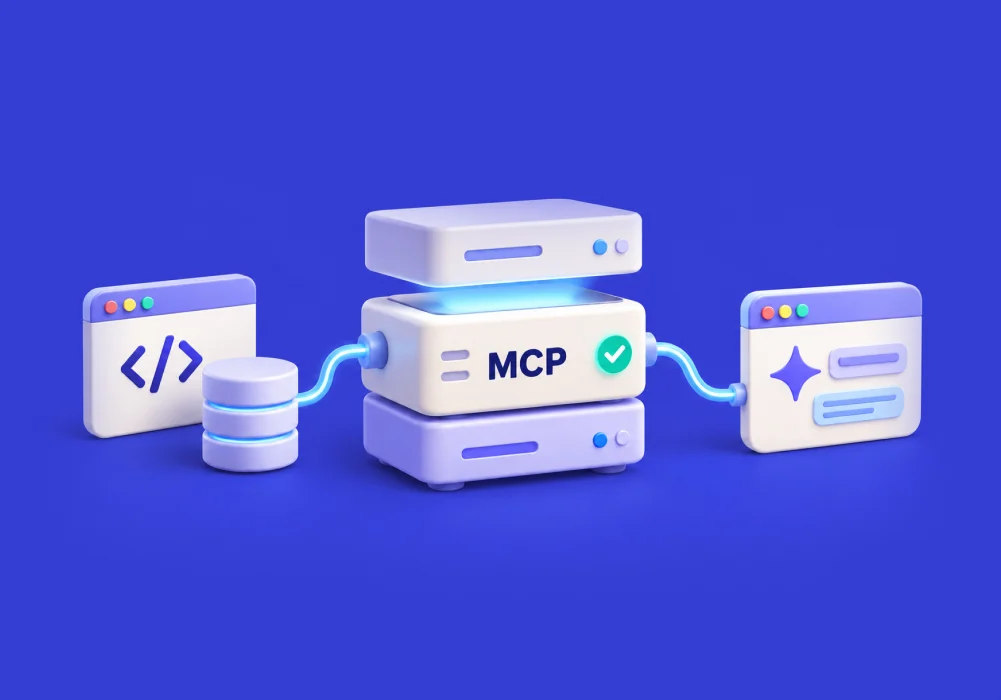
An AI application can reason through a task, but it cannot complete that task without access to the right information and tools. In an enterprise, that information is rarely in one place. It may sit across CRMs, ERPs, databases, knowledge bases, and internal applications.
Connecting AI to each of these systems can quickly create many separate integrations. MCP, or Model Context Protocol, provides a common way for AI applications to discover and use external tools and data through an MCP server.
The server acts as a controlled layer between the AI and the systems behind it. For example, an AI support agent may need to find a customer record, check an order, and create a support ticket. The MCP server can expose those specific actions as tools without opening up the entire underlying systems.
This gives enterprise teams a more consistent way to connect AI with existing technology while keeping the capabilities exposed to the AI clearly defined.
In this blog, we’ll cover when a custom MCP server makes sense, how to build one step by step, and what enterprises need to consider for testing, security, and production deployment.
Build vs. Buy: When Should Your Team Build a Custom MCP Server?
An existing MCP server can save development time if it already supports the systems, tools, and controls your workflow needs. A custom server makes more sense when the integration needs to match your own applications, business logic, or security model.
| Consideration | Buy / Use an Existing MCP Server | Build a Custom MCP Server |
|---|---|---|
| Enterprise systems | Required systems already have a suitable MCP integration | Internal or proprietary systems need custom integration |
| Business logic | Standard workflows and actions are enough | Workflow needs custom rules or processing |
| Integrations | Existing connectors cover the required tools | Multiple or unsupported systems need to be connected |
| Security | Existing access and authorization controls meet requirements | Organization needs custom authentication, authorization, or data controls |
| Tool control | Available tools match the workflow | Team needs precise control over which capabilities AI can access |
| Development effort | Lower initial development effort | Higher effort, with greater control over the implementation |
| Maintenance | Provider maintains the integration | Enterprise owns updates, testing, and ongoing maintenance |
| Best fit | Common, well-supported use cases | Proprietary, complex, or highly controlled workflows |
The decision should come down to one question: Does the available MCP server give the AI everything it needs while meeting the organization’s technical and security requirements?
When the answer is yes, buying or reusing an existing server is often the practical choice. When important capabilities are missing, building a custom MCP server gives the team greater control over how AI interacts with enterprise systems.
How to Build an MCP Server, Step by Step
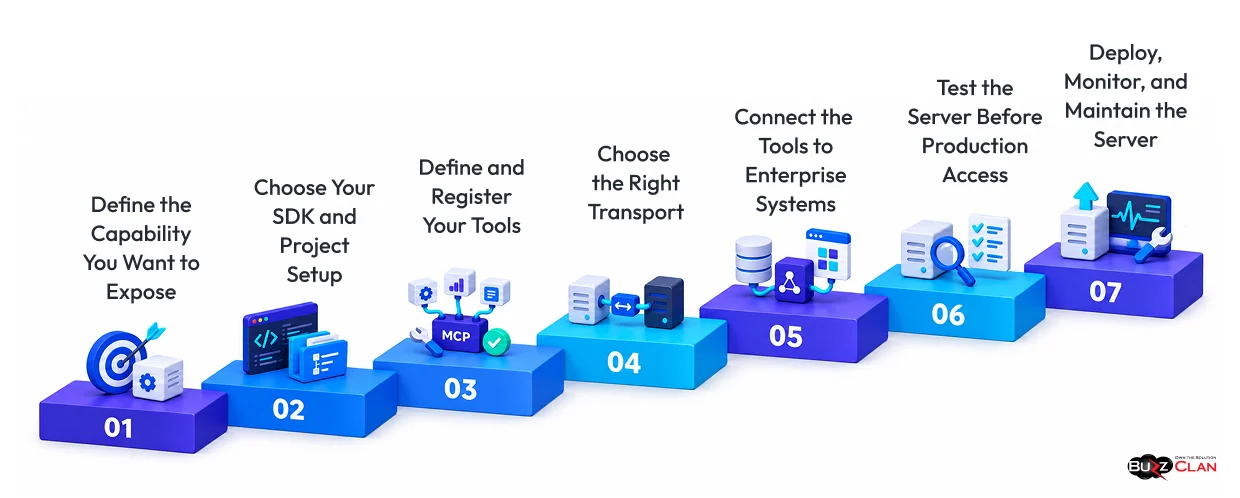
Once the team decides to build, the next question is how to structure the implementation.
A useful approach is to start with one business capability and build outward. The current MCP TypeScript SDK provides a direct path for creating servers that expose tools, resources, and prompts to compatible AI hosts. Its v2 documentation implements the 2026-07-28 MCP specification.
Step 1: Define the Capability You Want to Expose
Start with the task the AI needs to complete.
Suppose an internal support agent needs to:
- Find a customer
- Check an order
- Create a ticket
- Update the ticket
Do not expose the entire CRM or ticketing system. Instead, define the smallest set of tools needed for that workflow.
This makes the MCP server easier to secure, test, and maintain. It also gives the AI a clear set of capabilities to work with.
Step 2: Choose Your SDK and Project Setup
The implementation language should fit your team’s existing stack.
For TypeScript, the current MCP SDK v2 uses @modelcontextprotocol/server. The official SDK supports Node.js, Bun, and Deno. It also validates tool inputs with schemas.
A basic project can start with:
mkdir enterprise-mcp-server
cd enterprise-mcp-server
npm init -y
npm install @modelcontextprotocol/server zod
The SDK handles the MCP protocol layer. Your application code can then focus on the tools and enterprise operations behind the server.
Step 3: Define and Register Your Tools
Tools are the actions your MCP server makes available to the AI application.
For example, get_customer could retrieve customer information from a CRM.
A simplified TypeScript structure is:
import { McpServer } from "@modelcontextprotocol/server";
import { serveStdio } from "@modelcontextprotocol/server/stdio";
import * as z from "zod/v4";

serveStdio(() => {
  const server = new McpServer({
    name: "enterprise-server",
    version: "1.0.0"
  });

  server.registerTool(
    "get_customer",
    {
      description: "Retrieve customer information",
      inputSchema: z.object({
        customerId: z.string()
      })
    },
    async ({ customerId }) => {
      const customer = await getCustomerFromCRM(customerId);

      return {
        content: [
          {
            type: "text",
            text: JSON.stringify(customer)
          }
        ]
      };
    }
  );

  return server;
});
The official v2 SDK follows this same pattern with McpServer, registerTool, and inputSchema. The SDK validates the supplied arguments against the schema before the tool handler runs.
That validation gives each tool a defined contract.
Step 4: Choose the Right Transport
After defining the tools, the server needs a way to communicate with the client.
The current MCP specification supports stdio and Streamable HTTP as standard transport options.
Use stdio for local servers
Stdio works when the MCP client starts the server as a local process. It is useful for development and local integrations.
Use Streamable HTTP for remote servers
Streamable HTTP is designed for remote MCP services. It fits deployments where the server runs as a service and communicates over HTTP.
For an enterprise deployment, the transport should match where the server runs and who needs access.
Step 5: Connect the Tools to Enterprise Systems
With the server interface in place, each tool needs to connect to the system that performs the actual operation.
- A CRM tool can call the CRM API.
- A search tool can query an enterprise knowledge service.
- An ERP tool can use an existing integration layer.
- A legacy system may need an internal adapter when a direct API is not available.
The MCP server should sit between the AI application and those services:
AI application → MCP tool → authorization → enterprise service → filtered result → AI application
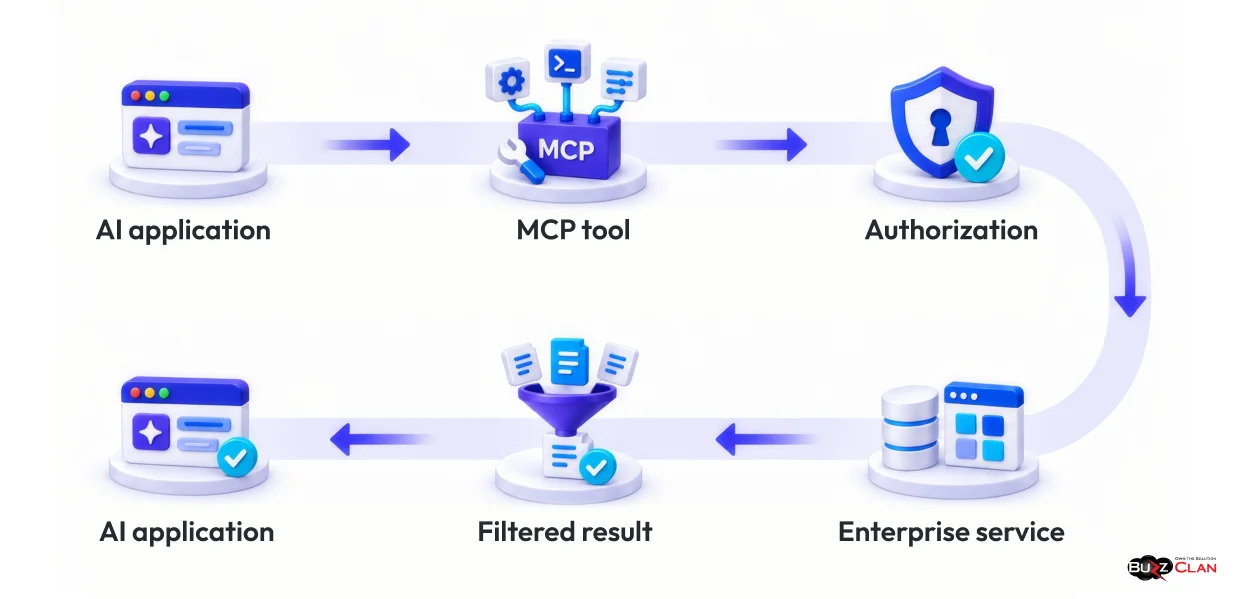
That structure keeps the AI-facing interface focused.
It also avoids exposing the underlying system directly to the model.
Step 6: Test the Server Before Production Access
A tool that works for the ideal request is not enough for an enterprise deployment.
Test valid inputs first. Then test the conditions that can break the workflow.
Try:
- Invalid input
- Missing permissions
- Empty results
- Failed API calls
- Timeouts
- Unexpected requests
- Restricted data
- Duplicate actions
The official MCP TypeScript SDK provides the MCP Inspector for testing and inspecting servers during development. You can use it to inspect available tools and invoke them before connecting the server to a broader application.
Testing should answer two questions:
- Does the tool work when everything is normal?
- Does it fail safely when something goes wrong?
Step 7: Deploy, Monitor, and Maintain the Server
A server that passes local testing still needs an operating model.
For production use, establish:
- Authentication and authorization so only approved clients and users can access the server.
- Secret management so credentials are not exposed through prompts or tool arguments.
- Logging so you can trace tool calls and important outcomes.
- Monitoring so failures and unusual activity can be detected.
- Rate controls so one client cannot overwhelm a connected enterprise service.
- Error handling so failures do not turn into unexpected downstream actions.
For remote MCP servers, the current MCP authorization model uses OAuth-based authorization, and protected servers are expected to validate access tokens for the intended MCP server. The specification also recommends least-privilege access.
Treat the server as a production service. That means versioning changes, monitoring dependencies, reviewing permissions, and updating the exposed toolset as business workflows change.
Securing Your MCP Server for Enterprise Use
The security question is simple:
What happens when AI has access to a tool that can affect a real enterprise system?
The answer has to be more than endpoint security. The MCP layer itself must control what the AI can request and what the connected system will allow.
Expose the Minimum Required Capability
Do not give an agent more tools than it needs.
A read-only lookup should not automatically include update or delete operations.
Smaller tool surfaces reduce unnecessary exposure.
Enforce Authentication and Authorization
Tie every remote request to an identity and check it against the permissions required for that operation.
The current MCP authorization specification supports OAuth-based authorization for protected HTTP servers and requires token validation for the intended MCP server. (Model Context Protocol)
Validate Tool Inputs
Every tool should define what it accepts.
Schema validation helps reject malformed or unexpected input before the underlying enterprise operation runs. The TypeScript SDK supports this through tool inputSchema definitions.
Protect Enterprise Data
The MCP server may have access to more information than the AI needs.
Filter the response before returning it.
For example, a customer lookup may need a support status but not the customer’s full financial profile.
Keep Secrets Outside the AI Context
Don’t pass API keys, database credentials, or service secrets through prompts or tool arguments.
Store them in the enterprise secret-management system and retrieve them only when the authorized server process needs them.
Log What Matters
Record the identity involved, the tool requested, the authorization result, relevant system responses, and errors.
These logs help teams investigate incidents and understand how AI is using enterprise capabilities.
Test for Failure, Not Only Functionality
A secure MCP server should behave predictably when requests fail.
Test invalid input, expired credentials, unavailable services, excessive requests, permission changes, and unexpected tool arguments before allowing production access.
Security is therefore part of the server design itself. It should not be treated as a final review before launch.
Connect Your AI to Enterprise Data, Securely, with BuzzClan
Building an MCP server is only one part of an enterprise AI integration.
The bigger engineering challenge is often connecting AI to existing systems without weakening the security, access, and business rules that already protect them.
BuzzClan has experience working with AI agents, enterprise integrations, and MCP-based architectures. Its published work includes a Google Workspace MCP integration for AI agents, designed around a secure gateway between internal AI platforms and remote MCP services. The architecture is intended to reduce the security and management challenges that can arise when an enterprise AI platform connects directly to multiple remote MCP services.
BuzzClan’s broader agentic AI services also include integrations with ServiceNow, Salesforce, Oracle, and custom APIs, along with enterprise security, governance, testing, and production deployment.
This experience can support MCP implementations from initial architecture through production deployment, with a focus on keeping the MCP layer aligned with the business workflow.
The server should expose only the tools and capabilities the AI needs, while connected systems continue to enforce their own business rules and access controls.
Give Your AI a Secure Path to Enterprise Systems
Connect AI with the tools and data behind your business through an MCP architecture designed around your workflows, integrations, and security requirements.
Conclusion
Building an MCP server starts with a simple question:
What does the AI actually need to do?
That answer determines which capabilities the server should expose, which systems it should connect to, and what permissions the AI should have.
From there, the implementation becomes structured. Define the tools. Choose the transport. Connect enterprise services. Test the workflow. Add authentication, authorization, data controls, logging, and monitoring. Then operate the server as a production service.
MCP does not replace your existing enterprise APIs or business systems. It provides a standard interface through which compatible AI applications can use selected tools and data.
When designed carefully, that interface can give AI access to useful enterprise capabilities without turning every system into an open connection point.
Build the MCP server around the workflow, expose only what the AI needs, and treat every exposed capability as a production-grade enterprise interface.
Have an MCP Use Case in Mind? Let’s Build the Right Path
Turn your enterprise AI requirements into a secure MCP architecture built around your systems, data, and workflows. Start with the use case, then define the right approach.
Frequently Asked Questions
Yes. An MCP tool can call an ERP or CRM through an existing API, integration service, or internal adapter. When a legacy application has no suitable direct interface, the MCP server can connect to a service layer that handles the underlying integration.
Use authentication, authorization, least-privilege access, input validation, secret management, data filtering, logging, and monitoring. For protected HTTP servers, the MCP authorization specification defines OAuth-based authorization and access-token validation.
Use an existing server when it already provides the required tools, integrations, and controls. Build a custom server when the workflow requires proprietary systems, custom business logic, specific access rules, or a controlled interface across internal services.
Test tool discovery, valid and invalid inputs, access controls, error handling, data filtering, API failures, and edge cases. The official TypeScript SDK also provides the MCP Inspector to test and inspect servers during development.
Use stdio for local server processes. Use Streamable HTTP when the MCP server needs to operate as a remote service. Both are supported transport options in the current MCP specification.
No. MCP provides a standard interface for AI applications to discover and use tools. Those tools can still call the APIs and services that already connect enterprise systems.
Yes. A server can expose several tools, with each tool connecting to a different approved system or service. The key is to define clear permissions and responsibilities for each tool.
Start with the workflow. Identify the information the AI needs and the actions it must perform. Then expose only those capabilities. This keeps the AI-facing tool surface focused and easier to secure.
BuzzClan’s AI services include strategy and consulting around business objectives, AI use cases, architecture, governance, and implementation planning. Its broader enterprise AI work can help assess the required integration approach before development begins.
BuzzClan has published work involving MCP-based AI agent integration, including a Google Workspace MCP architecture, and its agentic AI services cover enterprise integrations with systems such as ServiceNow, Salesforce, Oracle, and custom APIs.
BuzzClan’s enterprise AI services include security, governance, compliance, testing, and production deployment as part of its broader AI implementation work. Its published MCP integration work also focuses on controlling connections between enterprise AI platforms and remote MCP services.
Yes. BuzzClan’s agentic AI services cover enterprise system integration and multi-system workflows, including custom APIs and platforms such as ServiceNow, Salesforce, and Oracle.
BuzzClan’s broader agentic AI services extend through production deployment and ongoing optimization, including monitoring and performance support for enterprise AI systems.

Get In Touch