
Integrating Data Engineering Tools with Your Existing Stack
Manoj Kumar
Dec 29, 2025


Modern organizations don’t struggle because they lack data engineering tools—they struggle because they don’t have integrated data solutions that unify these tools and ensure reliable data flow. As stacks grow to include cloud warehouses, SaaS platforms, real-time pipelines, and legacy systems, integration becomes the difference between usable data and constant operational friction.
Without integrated data solutions, teams face slow reporting, inconsistent metrics, data quality issues, and growing compliance risks. Adding new tools without a clear integration strategy often makes the problem worse, creating tool sprawl, technical debt, and fragile pipelines that break when businesses scale.
True data integration is not about replacing everything at once. It’s about connecting existing systems intelligently, ensuring data flows reliably across platforms, and enabling teams to trust what they see without disrupting operations that already work.
In this blog, we explore why integrating data engineering tools into your existing stack is critical, the most common challenges organizations face, and a practical, phased approach to integration.
You’ll learn how to assess compatibility, run low-risk pilots, manage legacy constraints, and measure success so integration becomes a driver of insight and scale, not complexity.
Common Integration Challenges
Integrating different systems in an organization can feel overwhelming, but knowing the main problems and why they matter makes it easier to find solutions. These core challenges often affect everything from day-to-day operations to business growth.
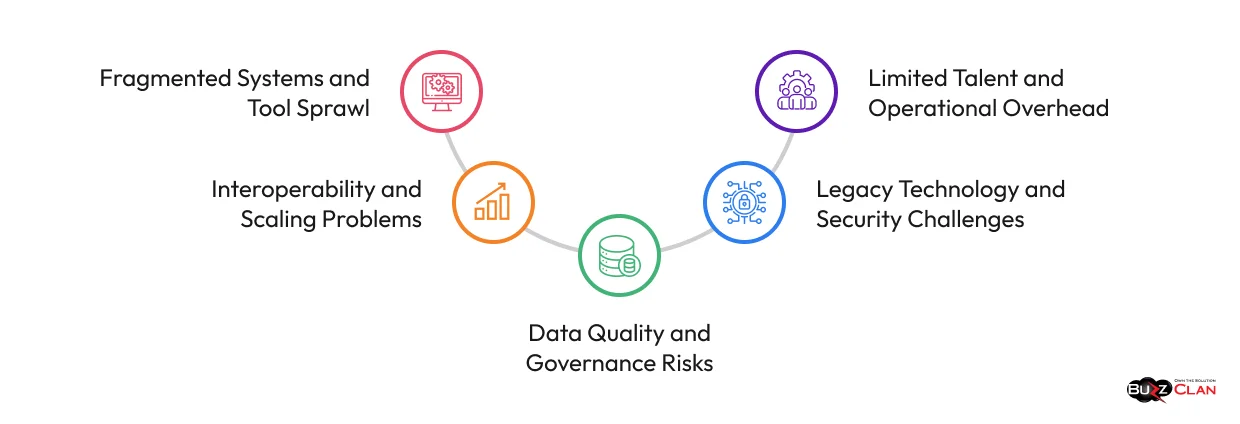
Fragmented Systems and Tool Sprawl
The first hurdle most teams encounter is data scattered across many software platforms, from old in-house applications to the newest cloud and SaaS solutions. Without integrated data solutions, teams must manually collect and match information, which wastes time and leads to errors. This fragmentation becomes worse when organizations accumulate too many tools with similar features, increasing costs and confusion because employees must learn and manage more software than they actually need.
Interoperability and Scaling Problems
Even after identifying all these scattered systems, connecting them presents its own set of challenges. Not all business systems naturally “fit” together—each may use different formats or rules for saving information, so bringing them into alignment can mean extensive custom coding or constant manual fixes. The situation becomes more difficult as the business grows and data volumes spike, because old integrations often slow down or break entirely, resulting in missed deadlines and poor customer experience.
Data Quality and Governance Risks
When data is integrated across systems, issues like missing, duplicate, or inconsistent records often surface. If left unchecked, these problems can spread across reports and dashboards, leading to confusion and unreliable insights.
At the same time, broader data access makes it harder to control who can view or modify sensitive information. Without clear rules and oversight, integration can increase compliance risk and reduce trust in the data. Integrated data solutions implement validation, governance, and monitoring to maintain accuracy, security, and compliance.
Legacy Technology and Security Challenges
Many integration issues stem from continued reliance on older systems that were never designed to work with modern platforms. These tools often require custom connections and manual workarounds, increasing cost and fragility. As more systems are connected, maintaining consistent security and meeting regulatory requirements becomes more complex, turning security into an ongoing operational challenge rather than a one-time effort.
Limited Talent and Operational Overhead
Successful integration depends not only on tools, but on people. Teams often lack the specialized skills needed to design, maintain, and scale integrated systems effectively. As a result, engineers spend more time managing issues, maintaining connections, and supporting users instead of focusing on higher-value initiatives. Over time, this operational load slows progress and limits the organization’s ability to innovate.
By understanding how these challenges connect and reinforce each other, IT leaders can develop comprehensive strategies rather than addressing symptoms one at a time.
Building Integrated Data Solutions Within Your Existing Stack
A successful integration starts with methodical planning and disciplined execution. The approach below breaks down the key steps teams should follow to evaluate, introduce, and operationalize new data engineering tools within an existing stack.

Assess Your Current Infrastructure and Identify Gaps
Before introducing any new tool, it’s important to understand how your current environment actually works—and where it falls short. Take a close look at how data moves today, from source systems to reporting and analytics, and note which tools support each step along the way.
This review often highlights practical issues, such as slow data updates, manual checks that consume time, or processes that don’t scale as data volumes increase. In other cases, the problem isn’t a lack of capability, but tools that are expensive to maintain or no longer well supported. Clearly identifying these gaps helps ensure that any new tool addresses real needs, rather than adding more complexity to the stack.
Evaluate Compatibility Before Committing
A tool may look strong on its own, but it needs to fit seamlessly into your existing environment to deliver value. Before committing, assess whether it works well with your current data formats, databases, cloud platforms, and the technologies your team already uses.
Look beyond product claims to understand the real integration effort involved. Prioritize tools with proven connectors, clear documentation, and active vendor support, and consider how easily your team can adopt and maintain them over time.
Run Pilot Tests Using Real Operating Conditions
Early testing is where expectations meet reality. Before rolling anything out broadly, test the tool in a controlled environment that closely reflects how your systems operate today. Choose a real use case—one that represents everyday workloads—rather than a simplified example designed to perform well in a demo.
During this phase, focus on practical outcomes. Observe how the tool performs under normal data volumes, how it handles errors, and how easy it is to troubleshoot when something goes wrong. It’s also useful to test less-than-ideal situations, such as incomplete data or sudden spikes in demand, to understand how the tool behaves under pressure.
Capture these learnings as you go. Notes on what worked, what didn’t, and what required extra effort will help shape a smoother rollout and prevent surprises later.
Implement Through Phased Parallel Processing
Replacing existing systems overnight introduces unnecessary risk. A more effective approach is to run the new tool alongside current processes for a defined period. This allows you to compare results, validate outputs, and build confidence before making a full transition.
Start with lower-impact areas, such as development environments or a limited set of data. For example, a new orchestration tool might first support internal testing workflows, or a processing tool might handle a single business domain. This gradual introduction limits disruption and makes issues easier to identify and resolve.
Regular comparisons between old and new outputs are essential. Differences should be understood and addressed before moving further, ensuring the transition is based on evidence rather than assumptions.
Monitor Closely and Shift Workloads Gradually
Once the new tool has proven stable, begin moving workloads in stages. Monitor performance carefully, as tools often need adjustment when they are exposed to the full range of real-world scenarios.
Be mindful of how changes affect surrounding systems. Improvements in one area can place added demand on others, such as downstream databases or reporting tools. These effects are not failures, but they do require attention and planning.
Maintain both systems during a stabilization period to retain flexibility. Older tools should be decommissioned only after the new solution has proven stable and reliable in production.
How to Measure If Your New Tools Are Paying Off?
Bringing a new tool into your stack is a big investment. Measuring whether it contributes to a truly integrated data solution is key to validating your investment.
The only way to know is by tracking the right metrics throughout every phase of integration.
Validation During Parallel Processing
While your new and old tools run side by side, measure how closely their outputs align:
- Track discrepancy rates between the two systems
- Document which differences represent actual improvements versus unexpected variations
- Measure processing time comparisons for the same workloads
- Monitor resource consumption to understand cost implications
Significant output differences aren’t necessarily bad—they often reveal hidden issues in legacy systems or indicate configuration tweaks needed in the new tool. Aim for output alignment above 98% before fully cutting over.
Performance Against Your Original Goals
Remember those specific gaps you identified before choosing the new tool? Now’s when you measure whether they’re actually getting fixed:
- If slow batch processing was the problem, are you now hitting real-time or near real-time speeds?
- If manual quality checks were bottlenecks, has automation reduced validation time and caught more issues?
- If orchestration complexity was overwhelming your team, can they now manage workflows more easily?
Quantify your improvements. “Faster” or “better” only matters with numbers: Did reporting drop from three days to three hours? Did error detection improve from 60% to 95%? Did pipeline failures go from weekly to monthly? Concrete metrics justify your investment and show whether you made the right choice.
Adoption and Team Productivity
The best tool fails if your team won’t use it:
- Track how many team members actively work with the new tool versus still relying on the old one
- Measure the time to competency for engineers learning the new system
- Monitor support tickets and troubleshooting time during the transition period
- Ask your team directly whether the new tool makes their work easier or more complicated
High adoption with positive feedback signals real problem-solving. Low adoption highlights areas for improvement—whether additional training, clearer documentation, or usability enhancements. Initial productivity dips are normal but should stabilize within weeks.
Cost and System Impact
Integration success goes beyond functionality. Consider the broader impact:
- Compare the total cost of ownership between the old and new tools, including licensing, infrastructure, and maintenance
- Measure the new tool’s impact on surrounding systems like database load, network traffic, and downstream processing
- Track system reliability metrics like uptime, error rates, and mean time to recovery
- Monitor whether the new tool introduces unexpected dependencies or single points of failure
Sometimes a new tool performs brilliantly in isolation but creates problems in your stack. A faster processing engine might overwhelm your databases with connection requests. Better Data Quality validation might reveal upstream issues that require additional work. These aren’t necessarily failures, but you need to account for them in your success calculation.
Stabilization and Long-Term Viability
Even after full cutover, measurement shouldn’t stop:
- Are performance metrics holding steady or degrading over time?
- How well does the vendor respond to issues and feature requests?
- Is the tool keeping pace with updates to your other systems?
- What’s the ongoing maintenance burden compared to your legacy solution?
Start with the three or four metrics that matter most for your specific integration. Track them consistently through pilot, parallel processing, cutover, and stabilization phases. Don’t be afraid to course-correct based on what the numbers tell you. Remember, successful tool integration isn’t just about connecting new technology. It’s about delivering measurable improvements that make your stack more capable while justifying the disruption and investment required to get there.
Conclusion
Integrating new tools into your stack transforms isolated systems into integrated data solutions that deliver measurable results, improve workflow efficiency, and enable confident decision-making. The key is starting with a clear gap assessment, validating compatibility thoroughly, and implementing through phased testing that proves value at every step.
Organizations that succeed don’t rush full deployments or skip pilots. They measure performance during parallel runs, track adoption metrics, and adjust based on feedback. Your existing infrastructure represents years of investment. Smart integration protects that foundation while unlocking capabilities that make your entire stack stronger.
Ready to Integrate New Tools Without the Risk? Let’s Talk.
From tool evaluation to seamless migration, our data engineering services help organizations add new capabilities to existing stacks without disrupting operations. For expert guidance on integrating modern data engineering tools into your stack, contact us here
FAQs

Get In Touch