ECS vs EKS: How to Choose the Right AWS Container Service
Munish Singh
Jan 9, 2026

Your engineering team just pushed a new microservice to production, but the release took longer than expected. Time was spent configuring cluster capacity, adjusting security groups, and troubleshooting why the load balancer was not routing traffic correctly.
For many teams running containers on AWS, this experience is common.
Containers are meant to simplify application delivery. You package the application once, deploy it consistently, and scale as needed. In practice, containers themselves are rarely the problem. The real challenge is orchestration—deciding where containers run, how they scale, and how failures are handled in production.
This is where Amazon Elastic Container Service (ECS) and Amazon Elastic Kubernetes Service (EKS) come into play. Both are AWS-managed services designed to orchestrate containers, handling scheduling, scaling, networking, and health checks so teams do not have to build these capabilities from scratch.
The confusion arises because ECS and EKS take very different approaches to solving the same problem. Choosing the wrong platform may not cause immediate failures, but it often introduces operational friction that slows teams down over time.
This guide breaks down ECS vs EKS in practical terms. It explains how each service works, where each one fits best, and how to choose the right option based on your team’s skills, workload requirements, and long-term cloud strategy.
What is Amazon ECS?
Amazon Elastic Container Service is AWS’s native container orchestration platform that handles where containers run, how they scale, and what happens when something fails, without requiring teams to manage Kubernetes complexity.
ECS schedules containers across available compute resources, monitors their health, and automatically replaces anything that crashes. The platform integrates directly with AWS services teams already use, including IAM for permissions, CloudWatch for logs and metrics, and load balancers for traffic distribution. This tight integration means less time connecting separate tools and more time deploying applications.
Two Ways to Run Containers on ECS
- EC2 Launch Type runs containers on EC2 instances that the team provisions and manages. This option works well when specific instance types, custom AMIs, or full control over the underlying infrastructure is needed for performance or compliance reasons. Teams handle capacity planning, patching, and scaling decisions for the cluster.
- Fargate Launch Type removes server management entirely by running containers on AWS-managed infrastructure. Teams define what the application needs in terms of CPU and memory, and Fargate handles provisioning and scaling automatically. This approach lets engineering focus purely on applications rather than maintaining the servers underneath them.
The main advantage of ECS is operational simplicity for AWS-focused environments, particularly when combined with other AWS services for cloud management. The trade-off is portability. ECS skills and configurations do not transfer easily to other clouds or on-premises environments if multi-cloud requirements emerge later.
What is Amazon EKS?
Amazon Elastic Kubernetes Service is AWS’s managed Kubernetes platform that gives teams the full Kubernetes experience without the operational burden of running and maintaining the control plane infrastructure themselves.
EKS runs the Kubernetes control plane, which is the system that makes all the scheduling, scaling, and management decisions for containerized workloads. AWS handles patching, upgrading, and ensuring high availability of this control plane across multiple availability zones, while teams focus on deploying applications using standard Kubernetes APIs and tooling. This matters because Kubernetes traditionally required specialized expertise to run reliably in production.
The key difference between EKS and ECS is standardization. Kubernetes is an open-source platform with a massive ecosystem of tools, extensions, and third-party integrations that work the same way across any environment. Teams can develop locally, test on EKS, and potentially run the same configurations on other cloud providers or on-premises clusters without rewriting orchestration logic.
Two Ways to Run Containers on EKS
- Self-Managed Nodes means teams provision and manage EC2 instances that join the Kubernetes cluster as worker nodes. This approach gives full control over instance selection, custom configurations, and node lifecycle management, which can be important for workloads with specific hardware requirements or organizations that need deep visibility into the infrastructure layer.
- EKS with Fargate removes node management entirely by running Kubernetes pods on serverless infrastructure. Each pod gets isolated compute capacity without teams needing to think about EC2 instances, scaling node groups, or patching operating systems. This combines Kubernetes portability with the operational simplicity of serverless computing.
The main advantage of EKS is ecosystem depth and portability, particularly valuable for organizations planning hybrid cloud advantages or multi-cloud strategies. The trade-off is complexity. Kubernetes assumes teams understand concepts like namespaces, role-based access control, and network policies, which adds learning overhead compared to ECS’s simpler abstractions.
ECS vs EKS: Which One Truly Fits Your Cloud Vision?
The choice between AWS ECS vs EKS depends on team capabilities, portability needs, and how much operational complexity the organization can manage effectively.
| Dimension | Amazon ECS | Amazon EKS |
|---|---|---|
| Learning Curve | Lower learning curve, uses familiar AWS concepts like task definitions and services | Steeper learning curve, requires understanding Kubernetes concepts like pods, deployments, and namespaces |
| Portability | AWS-only configurations and tooling do not transfer to other environments | Works across AWS, other clouds, and on-premises with consistent Kubernetes APIs |
| Operational Overhead | Minimal, AWS manages the control plane and abstracts cluster complexity | Higher teams manage Kubernetes configurations, RBAC policies, and cluster add-ons |
| Ecosystem Integration | Native AWS integrations with IAM, CloudWatch, ALB, and Secrets Manager work out of the box | Requires controllers and add-ons for AWS integration, but access to the vast Kubernetes ecosystem tools |
| Customization | Opinionated defaults, limited ability to customize scheduling and networking logic | Highly customizable with full control over scheduling, networking policies, and service meshes |
| Pricing Model | No control plane charges, pay only for underlying compute (EC2 or Fargate) | Control plane costs $0.10 per hour per cluster, plus compute costs |
| Best For | AWS-focused teams wanting operational simplicity and a faster time to production | Teams needing portability, advanced orchestration features, or standardization across environments |
Fargate Overview: The Serverless Engine Behind Both
AWS Fargate is a serverless compute engine that runs containers without requiring teams to manage servers.
In traditional container setups, teams provision EC2 instances, plan capacity, apply patches, and monitor cluster usage. Fargate removes this operational work by abstracting the infrastructure layer. Teams only define the CPU and memory each container needs, while AWS handles provisioning, isolation, and scaling automatically.
Fargate works with both ECS and EKS, so the serverless model is available regardless of the orchestration platform. With ECS, Fargate eliminates cluster management while keeping a simple, AWS-native experience. With EKS, it runs Kubernetes pods without the need to manage worker nodes, combining Kubernetes portability with serverless simplicity.
The benefit for cloud cost optimization is straightforward. Fargate charges only for the vCPU and memory resources containers actually consume while running, eliminating the need to over-provision EC2 capacity to handle traffic spikes. This also strengthens security posture by isolating each task or pod in its own compute environment, which matters for organizations managing compliance-driven cloud networking in regulated industries.
The trade-off is flexibility around infrastructure customization. Teams lose the ability to customize the underlying operating system, install specific kernel modules, or use GPU-accelerated instances for machine learning workloads. For applications that need those capabilities, EC2-based deployments remain the better choice.
Struggling to choose the right container platform?
BuzzClan helps teams choose, implement, and optimize ECS, EKS, and Fargate based on real business needs—not hype. Our cloud computing solutions turn container orchestration from an operational burden into a scalable, secure foundation for growth.
BuzzClan’s Serverless Container Blueprint for Clients
BuzzClan helps organizations navigate the ECS vs EKS decision by focusing on business outcomes rather than technical preferences, ensuring container platforms solve operational problems instead of creating new ones.
Infrastructure Assessment and Platform Selection
The approach starts with assessing current application architecture, team capabilities, and business constraints to determine realistic container adoption paths. This includes evaluating which workloads benefit from containerization, whether AWS investments favor ECS, or if Kubernetes standardization makes strategic sense, and how serverless computing patterns can reduce operational burden.
Platform Implementation
For ECS environments, BuzzClan implements automated deployment pipelines, designs optimized task definitions, and establishes monitoring using CloudWatch and AWS-native tools. For EKS environments, the focus is on cluster design that balances security with simplicity, implementing GitOps workflows, and establishing pod security policies that meet compliance requirements.
Ongoing Optimization
BuzzClan continuously monitors container performance, adjusts resource allocations based on actual usage patterns, and implements auto-scaling policies that respond to real traffic. This operational partnership ensures container platforms remain aligned with business needs as applications evolve, supporting better FinOps practices across the organization.
Common Mistakes to Avoid When Choosing Between ECS and EKS
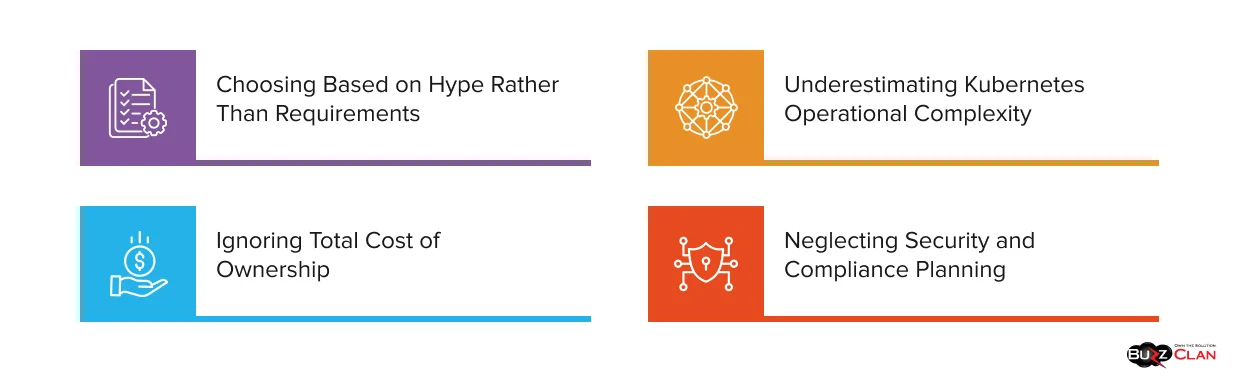
Organizations often make a few predictable mistakes when evaluating ECS vs EKS. Over time, these decisions create unnecessary complexity, higher costs, and operational friction.
Choosing Based on Hype Rather Than Requirements
Some teams choose EKS because Kubernetes is widely discussed, even when their applications do not need advanced orchestration features. This adds learning overhead and operational complexity. Others choose ECS for simplicity, only to realize later they need Kubernetes portability. The right choice depends on real workload needs and the organization’s cloud roadmap, not industry trends.
Underestimating Kubernetes Operational Complexity
While EKS manages the control plane, teams are still responsible for worker nodes, networking, security policies, and add-ons. “Managed Kubernetes” does not mean zero operations. Running EKS in production requires knowledge of RBAC, networking, upgrades, and monitoring. Teams should plan for training or external support early.
Ignoring Total Cost of Ownership
ECS vs EKS pricing discussions often focus on compute costs alone. In reality, operational costs matter just as much. EKS control plane fees add up across environments, but expertise, tooling, and ongoing maintenance usually drive the larger expense. Evaluating the total cost of ownership helps avoid surprises later.
Neglecting Security and Compliance Planning
Container security differs from traditional server security. Both platforms need encrypted secrets management, least-privilege IAM policies, image scanning, and proper cloud security best practices. Plan security architecture alongside platform selection rather than retrofitting controls after production deployment.
Conclusion: Let BuzzClan Design Your AWS Container Strategy
Choosing between ECS and EKS is less complicated than it first appears. The key is to focus on the problem containers need to solve today, not hypothetical needs years down the line. ECS works well when teams want fast deployments with minimal operational overhead. EKS makes sense when portability, standardization, or Kubernetes expertise already exists.
Most teams already know which direction makes sense after honestly evaluating current capabilities and near-term architectural plans. The challenge is not choosing between ECS and EKS, but implementing the choice well enough that containers become an enabler rather than another layer of complexity to manage.
BuzzClan turns container orchestration decisions into working production systems that engineering teams actually want to use. The focus is on getting applications running reliably while reducing the operational burden that typically comes with container adoption.
The difference between a successful container strategy and one that stalls is implementation expertise. BuzzClan helps organizations move past the ECS vs EKS debate and into production environments that actually deliver on the container promise—faster deployments, lower operational overhead, and infrastructure that scales with business needs instead of fighting against them.
Connect with our cloud experts today to turn container orchestration from a technical headache into the competitive advantage your engineering team has been working toward.
FAQs

Get In Touch