What Is Cloud Storage? Building a Secure Hybrid & Multi-Cloud Strategy
Priyanshu Raj
Feb 10, 2026
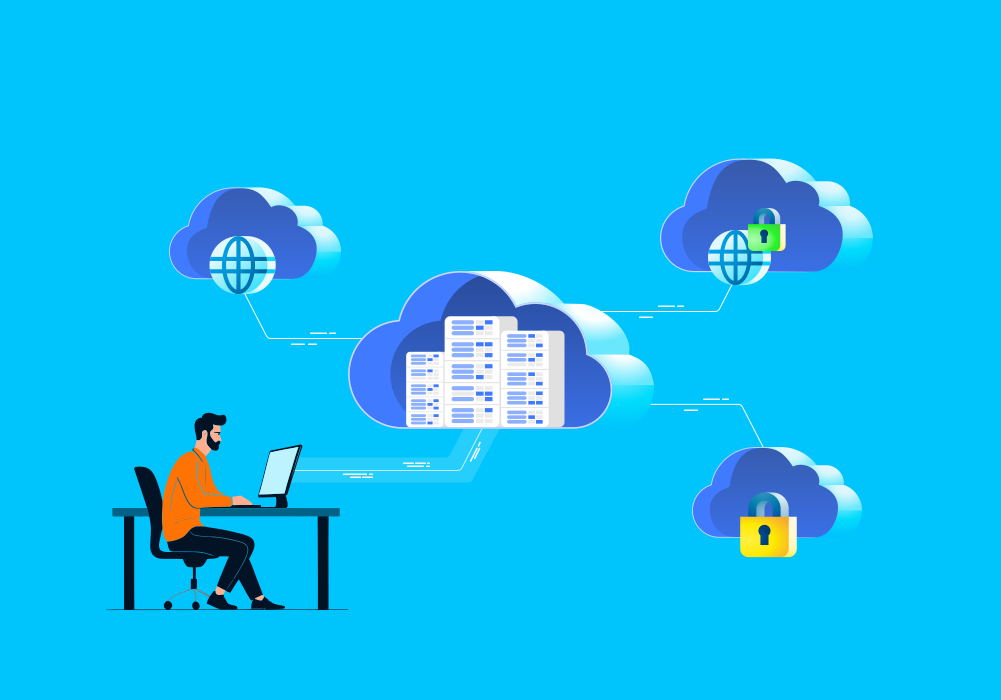
Did you know that the global cloud storage market is projected to reach $576.22 billion by 2033?
The rise of remote work, rapid digital adoption, and the explosion of big data are just a few key factors accelerating demand.
But what is cloud storage?
At its core, cloud storage is a technology that allows you to save, access, and manage data over the internet, rather than on a physical hard drive or local server. Think of it as a virtual filing cabinet that you can access from anywhere, at any time.
One of the most immediate benefits is cost efficiency, as cloud storage reduces the need for expensive hardware and ongoing server maintenance. But beyond cost savings, why are so many businesses actively investing in cloud storage today?
For small and mid-sized businesses (SMBs), cloud storage offers an accessible way to improve scalability and control costs. Many providers offer entry-level plans that make adoption straightforward and affordable.
However, enterprise organizations have more complex requirements. They need high-performance infrastructure, advanced security controls, robust compliance capabilities, and seamless scalability to support large-scale operations.
This is where more sophisticated approaches — like hybrid and multi-cloud strategies — come into play, giving businesses greater flexibility, resilience, and control over where and how their data lives.
The value of cloud storage extends far beyond basic file storage or cost savings. In this blog, we’ll explore its strategic benefits, implementation considerations, and how to determine the right solution for your business.
Types of Cloud Storage
Let’s explore the different types of cloud storage models available. Each type serves a different purpose and can be optimized for various workloads.
Object Storage
As the name suggests, this cloud storage type stores data as objects, not in a defined hierarchy. So, what can be stored here? It is ideal for backups, multimedia content, and cloud-native applications. Storing data as objects helps you quickly retrieve and scale data conveniently. The benefits don’t end here! This storage type is one of the most durable options. If you are looking for viable options for your business, Amazon S3 and Azure Blob Storage are ideal choices.
Block Storage
If you’re wondering how block storage supports your business, it is particularly well-suited for high-performance workloads such as virtual machines and databases. In this storage model, data is divided into fixed-size blocks, each assigned a unique identifier. These blocks can then be distributed across multiple storage environments while remaining easily retrievable.
This architecture enables high throughput and low latency, making block storage ideal for applications that demand consistent performance and speed. A widely used example of block storage is Amazon Elastic Block Store, which is designed to support scalable and performance-intensive cloud workloads.
File Storage
The most organized storage option, file storage, stores data in designated directories and subdirectories. This storage type is best suited for content management systems and web-hosting environments. When it comes to handling structured data, you must choose this option. Moreover, you can easily access it from multiple devices over a network, making it the best choice for collaborative storage. A good choice for business would be Azure Files and Google Filestore.
Cold Storage (Archival Storage)
Cold storage is well-suited for infrequently accessed data that must be retained for legal, compliance, or backup purposes. The trade-off, however, is slower retrieval speeds in exchange for significantly lower storage costs. Depending on the provider and configuration, data retrieval may take minutes or even hours. For this reason, cold storage is commonly used for long-term regulatory archives and disaster recovery backups. A widely adopted example is Google Cloud Storage Archive, which is designed for durable, low-cost data retention.
How Does Cloud Storage Work?
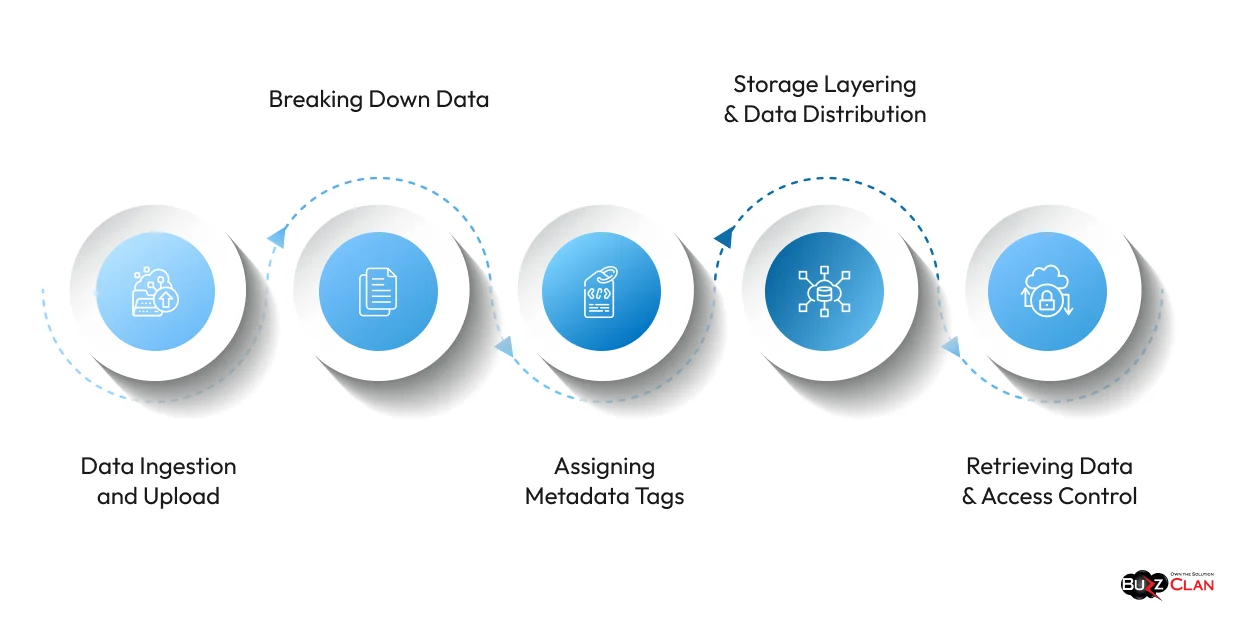
Having understood the multiple cloud storage types, it is time to know how cloud storage works.
Data Ingestion and Upload
In the first step, you or an application uploads data to a cloud storage solution. Once uploaded, it is processed on the edge of your cloud provider’s network. This processing involves compressing, deduplicating (ensuring no redundant copies are on cloud storage), and encrypting data. Content delivery networks (CDNs) are often used to reduce lag and optimize the upload process before data is stored in the primary storage cluster.
Breaking Down Data
In this step, the data is broken into smaller chunks, and this is done to boost reliability and scalability. These data chunks are distributed carefully across multiple storage nodes in different data centers or availability zones. But what is the whole purpose of this? It ensures that numerous copies of your data are stored in different locations. However, they are compressed, encrypted, and encoded to ensure minimal space is taken while maintaining top-notch security.
Assigning Metadata Tags
In this stage, each file or object is tagged as metadata. This includes details, file size, types, permissions, and the exact location in the distributed network. Cloud storage systems maintain a complete index of metadata to help you locate and retrieve data in real-time.
Storage Layering and Data Distribution
Not all data needs to be accessed at the same time, which is why organizations use storage tiering. Frequently accessed data is stored in hot tiers, while cold and archival tiers provide lower-cost options for infrequently used or long-term retention data, with slower retrieval times. Data is distributed across storage nodes using hashing algorithms to balance workloads and minimize disruption as systems scale.
Retrieving Data and Access Control
When you request stored data, the cloud storage system will locate the required chunks, recreate them, and deliver the file. When we talk about the role of access control, it helps cloud providers ensure that only authorized personnel are seeking access. Stringent mechanisms are implemented to ensure that no third party can misuse the data.
Cloud Storage Deployment Models
Understanding deployment models is crucial when selecting the right cloud storage solution for your business. Each model offers distinct advantages depending on your security requirements, budget constraints, and operational needs.
Public Cloud Storage
Public cloud storage is the most widely adopted deployment model, where storage infrastructure is owned and managed by third-party providers like AWS, Google Cloud, and Microsoft Azure. Multiple organizations share the same infrastructure, making it highly cost-effective. The beauty of public cloud storage lies in its scalability. You can expand storage capacity on demand without worrying about hardware procurement. It’s perfect for startups, SMBs, and enterprises looking to reduce capital expenditure while maintaining flexibility.
Private Cloud Storage
Private cloud storage is dedicated exclusively to a single organization. It can be hosted on-premises or managed by a third-party provider in a dedicated environment. This model offers maximum control, enhanced security, and compliance capabilities, making it ideal for industries like healthcare, finance, and government that handle sensitive data. While it comes with higher costs compared to public cloud, the trade-off is complete customization and data sovereignty. If regulatory compliance and data privacy are non-negotiable, private cloud storage is your go-to option.
Hybrid Cloud Storage
Hybrid cloud storage combines the best of both worlds—public and private cloud. Organizations can store sensitive data in a private cloud while leveraging the scalability and cost-efficiency of public cloud for less critical workloads. This model offers flexibility, allowing businesses to move data between environments based on performance needs, compliance requirements, and cost considerations. Many enterprises are adopting hybrid cloud strategies to balance security with operational agility.
Multi-Cloud Storage
Multi-cloud storage involves using services from multiple cloud providers simultaneously. Why would businesses do this? To avoid vendor lock-in, improve redundancy, and optimize costs by selecting the best storage solutions from different providers. For instance, you might use AWS S3 for object storage, Azure for backups, and Google Cloud for analytics workloads. While multi-cloud offers flexibility and resilience, it also introduces complexity in management and integration. However, with the right orchestration tools, businesses can unlock significant benefits.
Cloud Storage vs. Traditional Storage
Let’s understand the difference between cloud and traditional storage.
| Aspect | Cloud Storage | Traditional Storage |
|---|---|---|
| Infrastructure | Uses remote servers managed by a cloud provider | On-premises data centers managed internally |
| Deployment Model | Hosted on cloud platforms like AWS, Azure, and GCP | Hosted on local storage devices like HDDs, SSDs, NAS, SAN |
| Scalability | Highly scalable and elastic expansion on demand | Limited scalability options and requires hardware upgrades |
| Performance | Varies based on network speed and storage tier | High-speed access within the LAN is limited by local hardware |
| Latency | Higher due to network dependency | Lower latency within a local environment |
| Data Accessibility | Accessible from anywhere via the internet | Limited to the local network or VPN |
| Redundancy & Availability | High availability with multi-region redundancy | Depends on RAID setups and backup strategies |
| Security | Managed security with encryption, IAM, and compliance policies | Full control over security requires manual configurations |
| Cost Structure | Pay-as-you-go model (storage + data transfer fees) | High upfront cost for hardware & maintenance |
| Backup and Recovery | Automated backup and disaster recovery options | Requires manual setup and maintenance |
| Data Durability | 99.99% durability in cloud platforms | Requires internal audits and regulatory adherence |
| Compliance and Governance | Limited control over hardware and configurations | Full customization of hardware and storage architecture |
| Maintenance | Managed by the cloud provider, and no hardware upkeep is required | Requires an IT team for hardware maintenance and upgrades |
| Data Transfer Speed | Dependent on the internet bandwidth and the provider’s limits | Direct, high-speed transfer within a LAN environment |
Cloud Storage Architecture for Hybrid & Multi-Cloud
As businesses scale and diversify their cloud strategies, hybrid and multi-cloud architectures have become essential for balancing performance, cost, and flexibility.
Hybrid cloud storage architecture
It connects on-premises infrastructure with public cloud environments, allowing seamless data movement between the two. This setup is ideal for organizations that need to keep sensitive data on private servers while leveraging public cloud for scalability and cost savings. The key is integration—using tools like AWS Storage Gateway or Azure Arc to create a unified storage layer that works across environments without friction.
Multi-cloud architecture
It takes things further by distributing workloads across multiple cloud providers. This approach reduces vendor lock-in and improves resilience. If one provider experiences downtime, your data remains accessible through another. However, managing multi-cloud storage requires robust orchestration and monitoring tools to handle different APIs, pricing models, and security protocols.
Multi-cloud also enables purpose-built storage environments. Rather than forcing every workload through a single provider, organizations can route performance-sensitive data to AWS, compliance-heavy workloads to Azure, and analytics pipelines to Google Cloud — each provider doing what it does best. The result is a cost-optimized, resilience-first architecture instead of a one-size-fits-all dependency.
Both architectures rely on data orchestration layers that automate data placement, replication, and retrieval based on predefined policies. This ensures that frequently accessed data stays in high-performance tiers while archived data moves to cost-effective cold storage.
The challenge? Complexity.
Hybrid and multi-cloud environments demand strong governance, consistent security policies, and skilled teams to manage them effectively. But when executed well, they deliver unmatched agility, cost optimization, and operational resilience.
Building a Secure Hybrid & Multi-Cloud Storage Strategy
Creating a secure hybrid and multi-cloud storage strategy requires careful planning, governance, and ongoing management.
Start with Smart Data Classification
Not all data needs the same level of security. Identify which workloads belong in private clouds, which can leverage public cloud cost-efficiency, and what should be distributed for redundancy. This ensures you’re not overspending on high-security storage for low-risk data.
Unify Access Control Across Clouds
When data spans multiple environments, inconsistent access controls create vulnerabilities. Use centralized IAM solutions that enforce role-based access, multi-factor authentication, and least-privilege principles across all platforms.
Protect Data with Encryption
Encryption is non-negotiable. Data should be encrypted both at rest and in transit. Use customer-managed encryption keys whenever possible to maintain control, even in public cloud environments.
Stay Compliant with Strong Governance
Hybrid and multi-cloud architectures complicate compliance. Map out where data resides, ensure it meets regional data sovereignty laws, and maintain audit trails. Regular compliance audits help you avoid costly penalties.
Detect Threats with Automation
Manual oversight isn’t scalable. Deploy AI-driven security tools that detect anomalies, track unauthorized access, and respond to threats in real time. Automated monitoring reduces response time and catches breaches early.
Ensure Business Continuity
Multi-cloud strategies improve resilience only if you’ve designed failover mechanisms and tested them regularly. Automate backups, replicate critical data across regions, and ensure recovery time objectives align with business needs.
A secure hybrid and multi-cloud storage strategy aligns infrastructure with business goals while staying ahead of evolving security threats.
Security & Governance in Cloud Storage
Cloud storage security requires layered defenses that protect data at rest, in transit, and during access, while ensuring compliance frameworks are met without slowing down operations.
The shift to cloud introduces security challenges that traditional on-premises approaches were not designed to handle. Data lives outside physical perimeters, accessed by distributed teams using various devices and networks. This demands a security model that assumes no implicit trust and verifies every access attempt continuously based on user behavior, device posture, and location.
Building Resilient Storage Systems
Hardware failures and regional outages are inevitable. Cloud providers store multiple copies of data across geographically distributed data centers, ensuring information remains accessible during disasters. This redundancy improves data integrity through automatic validation that detects and corrects corruption before it impacts operations. When one data center experiences issues, workloads seamlessly shift to backup facilities, minimizing downtime.
Access Control and Encryption
Strong access control starts with least-privilege principles that grant users only the permissions needed for specific tasks. Organizations should implement customer-managed encryption keys rather than relying solely on provider-managed options, maintaining full control over who can decrypt sensitive information. Continuous monitoring detects suspicious access patterns and potential breaches before they escalate.
Meeting Regulatory Requirements
Cloud compliance frameworks align security policies with regulatory standards, including HIPAA, PCI DSS, GDPR, and SOC 2. Governance policies must enforce data classification, retention schedules, and automated compliance auditing to ensure ongoing adherence. Failing to implement proper governance creates compliance gaps, exposing organizations to regulatory fines and legal liability. Clear ownership, role-based access controls, and comprehensive audit trails are essential for regulated industries. Data sovereignty adds another dimension to this. Organizations operating across multiple regions must verify that data doesn’t cross jurisdictional boundaries without authorization. Even when encryption and access controls are properly configured, storing data in the wrong region can trigger regulatory violations — making residency tracking a non-negotiable part of any governance framework.
Importance and Benefits of Cloud Storage in 2026
It is time to explore why cloud storage is necessary. Simply put, reliability, consistency, and scalability are the reasons. You will be surprised to know that data growth is expected to hit 230-240 zettabytes by 2026. Traditional storage solutions are not built to keep up with the changing demands. At the same time, cloud storage helps you eliminate the need for on-premise solutions and works on demand. This is why top-cloud providers use distributed storage to ensure your data has multiple copies across locations for higher availability and prompt data recovery.
Scalability
Scalability continues to be a prominent advantage of cloud storage. Cloud storage offers horizontal scaling (workload distribution) instead of traditional data centers, which require physical upgrades to boost capacity. And this is possible with the help of distributed storage networks. Have you ever wondered how giants like Amazon handle millions and trillions of objects and never run out of storage space? Well, scaling ease with the cloud is the only reason.
Durability
Hardware failures never come announced. Thus, it helps to be prepared in advance. Luckily, cloud storage providers leverage erasure coding and data replication to help you keep your data intact. While the former breaks data into sectors and encodes it to add redundancy, the latter involves creating multiple copies and backups. This is why businesses trust Google Cloud Storage, as it automates data distribution across regions and reduces the risk of data loss. Banking systems and healthcare organizations increasingly depend on cloud storage to maintain data integrity.
Cost-Efficiency
Cloud computing is all about leveraging pay-as-you-go models. Cloud storage helps you do that and much more. Not only do you reduce your capital expenditure (CapEx) on hardware, but you can also cut your IT costs by 30-50%.
Data Accessibility and Security
Cloud storage and solutions ensure seamless remote work. Dropbox and Google Drive let you and your employees access files anytime and anywhere, boosting productivity and collaboration. By 2028, cloud will not be a hyped technology but a must-have to gain a competitive edge and achieve top-notch operational abilities. So, if you have not yet hopped on the train, let us remind you that time is slipping through the cracks. Make the best use of it!
Security and Encryption
We know that cloud security is paramount. This is why cloud storage services provide end-to-end encryption. However, encryption alone is not enough. Cloud storage services enforce identity and access management (IAM) policies and multi-factor authentication (MFA) to ensure that only authorized personnel can access data. However, you will still need to be cautious about insider threats. You must train your employees properly and educate them about the importance of vigilance. Lastly, compliance with industry standards further adds a security layer. So, ensure you are fulfilling all guidelines, or if you find yourself confused, rope in a consultant.
Seamless Integration with Applications
Cloud storage is designed to integrate easily with DevOps pipelines and AI/ML workloads. Cloud providers provide APIs and SDKs ( Software Development Kits) to make this possible. This is why services like Google Cloud Functions and AWS Lambda make provisions for serverless computing, where stored data can be easily accessed and processed without needing dedicated servers.
Best Cloud Storage Solutions for Businesses in 2026
Choosing the right cloud storage solution depends on organizational size, security requirements, collaboration needs, and budget constraints. The market offers diverse options ranging from enterprise-grade platforms with unlimited scalability to specialized providers focusing on encryption and compliance.
Here’s a detailed comparison of the leading business cloud storage solutions in 2026:
| Provider | Best For | Storage Capacity | Starting Price | Key Features | Ideal Use Case |
|---|---|---|---|---|---|
| Dropbox Business | Overall business collaboration | 3TB to 1,000TB per user | Contact for pricing | Dropbox Transfer (up to 250GB), 180-day file recovery, eSignatures, Dropbox Spaces with ML-powered organization, 1,500+ app integrations | Teams prioritizing ease of use and extensive third-party integrations |
| Microsoft OneDrive | Microsoft 365 integration | 1TB+ per user | $5/user/month | Seamless Office 365 integration, real-time collaboration, robust security features, ransomware detection and recovery | Organizations already invested in the Microsoft ecosystem |
| Google Workspace | Cost-effective collaboration | 30GB to unlimited | $6/user/month | Native integration with Google apps, AI-powered search, shared drives, advanced sharing controls | Teams using the Google productivity suite requiring simple file sharing |
| Box | Enterprise security | Unlimited | $20/user/month | 5GB file uploads, 1,500+ integrations, advanced workflow automation, granular permissions, compliance certifications | Companies of all sizes needing secure file-sharing |
| AWS S3 | Enterprise scalability | Unlimited | Pay-as-you-go (starts ~$0.023/GB) | Enterprise-grade security, limitless scalability, advanced computing integration, multiple storage classes | Companies with IT resources handling big data and distributed systems |
| Egnyte | Hybrid cloud deployment | 10TB per user (Enterprise: 50GB/employee) | Custom pricing | Hybrid storage model, on-premise + cloud flexibility, AI-powered policy enforcement, BYOD risk mitigation | Businesses with compliance requirements needing both cloud convenience and on-premise control |
| Backblaze B2 | Unlimited backup | Unlimited | $7/month per computer | Unlimited backups, continuous syncing, 1-year version history, physical USB restore option | Organizations prioritizing disaster recovery over collaboration |
| Sync.com | Privacy and encryption | 1TB to unlimited | $6/user/month (Teams Standard) | End-to-end encryption, 180-day file restore, GDPR/HIPEDA/HIPAA compliance, password-protected links | Small businesses requiring strong security on a budget |
| Tresorit | Maximum encryption | 1TB to 2TB per user | Contact for pricing | End-to-end encryption, zero-knowledge architecture, remote wipe, two-factor authentication enforcement | Industries handling highly sensitive data where privacy is paramount |
| Proton Drive | Swiss privacy compliance | Starts at 200GB | $3.99/month | End-to-end encryption, Swiss privacy laws, 10-year version history, zero-access encryption, GDPR compliance | Organizations in regulated industries requiring maximum data sovereignty |
Key Factors to Consider When Choosing Cloud Storage
Now that you know the top players for cloud storage in 2026, it is time to understand the essentials when choosing a cloud storage provider and picking the right option among the top choices.
Assessing Storage Performance
A host of technical factors is involved when you have to assess the performance of a cloud storage solution. For that, you need to develop an understanding of your read/write requirements and latency sensitivity. High-performance applications encompass real-time analytics, and they also require low-latency storage solutions.
At the same time, if you are dealing with archival workloads, you will need to deal with cold storage tiers and pave the way for higher latency. Additionally, some cloud storage solutions are adept for block storage solutions, which can be customized for high IOPS (Input/Output Operations Per Second) and can be used to handle databases and virtual machines. Before selecting a cloud storage solution, thoroughly assess your needs and then proceed to invest.
Scalability and Durability
Nearly all cloud providers offer a promise of 99.99% uptime. However, in the case of scalability, things differ based on storage type. While object storage solutions are designed for unlimited scalability, the same is not the case with file storage options. You will need to deal with performance constraints and size limitations. So, you must decide what storage best suits your business needs. We suggest using a solution that offers multi-region replication and can boost data availability and disaster recovery capabilities. This will help you prevent data loss and regional outages.
Security and Compliance Options
Security and compliance are essential when choosing a cloud storage solution. Not only do you need to evaluate encryption options, but you will also need to check how stringent their entity and Access Management (IAM) policies are. If you plan to work with a cloud provider that doesn’t offer compliance certifications, you are setting yourself up for trouble. Make sure they offer compliance with SOC 2, HIPAA, PCI-DSS, and GDPR to ensure you don’t end up paying hefty fines and penalties. Lastly, check if they offer audit logging and anomaly detection tools. This will help you track access and detect potential security threats.
Cost Efficiency
While most providers offer dynamic pricing, they charge for data retrieval, API requests, and outbound data transfer. This can quickly add to the total cost of ownership. As a result, you need to evaluate pricing models and leverage lifecycle policies to ensure less-frequently accessed data stays in lower-cost tiers. You also need to select storage options that offer built-in redundancy, as they will reduce the need for costly backup solutions. Additionally, monitoring tool support is a must to keep track of expenses and avoid unexpected charges.
User Interface, Customer Support, and Integration Options
Is your cloud storage provider offering poor-quality user interfaces? Well, it is time to bid them goodbye! Another thing to consider is how their customer support is. Are they available at odd hours if you encounter an issue? Do they have a dedicated knowledge base to help you, or at least automated chatbot support? If yes, you are in good hands; otherwise, you must reconsider your choices. Last but not least, can you integrate your chosen cloud storage option with your existing systems? Ensure all these aspects align with your business expectations for a perfect choice.
AI & ML in Cloud Storage Optimization
AI and ML can help businesses optimize cloud storage, reduce costs, and improve scalability. And how does that happen? MLOps enables you to predict usage trends effectively, allocate resources, and move data to tiers as needed. With the global AI cloud market expected to reach USD 327.16 billion by 2029, you should consider integrating it with your storage systems.
AI-driven deduplication and compression techniques will not only help you reduce bandwidth consumption, but they will also help you boost performance in cloud environments. Wait, there is more to it! Security is another area where AI and ML play a significant role. Now, hackers are using AI to advance their threats. However, AI is also helping to strengthen cloud infrastructure.
Hybrid & Multi-Cloud Data Migration Strategies
Migrating data across hybrid and multi-cloud environments is a strategic initiative that determines operational flexibility, disaster recovery capabilities, and long-term vendor independence.
Migration Approaches
Multi-cloud migration requires evaluating each application and dataset individually:
- Rehost (Lift and Shift): Move applications with minimal modifications for quick migrations
- Replatform: Make selective optimizations during migration without changing core architecture
- Refactor: Redesign applications for cloud-native capabilities, maximizing scalability and performance
- Retire: Decommission applications that no longer provide business value
- Retain: Keep certain workloads on-premises when compliance or performance requirements dictate it
Migration Process
- Assessment and Planning: Evaluate data volume, dependencies, and compatibility with target environments. Map application architectures, identify security requirements, and establish success criteria before moving anything.
- Strategy Definition: Select appropriate cloud providers for specific workloads and use standardized APIs and containerization to ensure seamless integration between platforms. Design applications with portability in mind to avoid vendor lock-in.
- Execution and Validation: Implement phased cutovers with continuous data synchronization to minimize downtime. Test thoroughly before final cutover and validate that migrated data matches source systems.
Address data transfer latency by optimizing data placement, managing costs with cloud monitoring tools, and developing backup strategies to safeguard against data loss during migration.
Cost Optimization for Cloud Storage
Cloud storage promises cost efficiency, but without active management, expenses escalate through data transfer fees, inefficient storage tier usage, and orphaned resources. Organizations can reduce cloud storage costs by almost half through strategic optimization.
Storage Tier Optimization
Implement automated lifecycle policies that move data between storage tiers based on access patterns. Keep frequently accessed data in hot storage, transition older data to cool storage, and archive rarely accessed data in cold storage, where costs drop significantly. Audit storage monthly to delete orphaned volumes and implement automated cleanup for temporary files.
Right-Sizing and Autoscaling
Over-provisioned storage wastes money on unused capacity. Assess actual workload requirements and scale resources appropriately. Implement autoscaling features that adjust capacity dynamically based on real demand rather than worst-case scenarios.
Reserved Capacity and Data Transfer Management
Lock in long-term commitments through reserved instances or savings plans that offer significant discounts for predictable storage workloads. Minimize data egress fees by keeping workloads and storage within the same region whenever possible.
Governance and Monitoring
Establish cost governance with resource tagging that tracks expenses by team, project, or environment. Set spending limits and automated alerts to prevent budget overruns. Monitor idle resources continuously and shut down anything not actively used. These forgotten resources often represent a third of total cloud spending.
Cloud Storage Use Cases
Cloud storage has evolved from a simple file repository into a critical infrastructure component that powers diverse business operations across industries. Understanding practical applications helps organizations identify where cloud storage delivers the most value.
Remote Collaboration and File Sharing
Remote work has become standard for most organizations. Cloud storage enables employees to access files from anywhere, fostering collaboration across geographies. Real-time document editing and version control ensure teams work on the latest data without duplication, particularly valuable for consulting firms, creative agencies, and distributed development teams.
Data Backup and Disaster Recovery
Cloud storage offers reliable backup solutions that automatically sync critical data, ensuring business continuity. Healthcare providers securely store patient records while complying with HIPAA regulations, and financial institutions minimize downtime during data loss incidents. Creating off-site remote copies addresses industry regulations like HIPAA, CJIS, and FedRAMP.
Healthcare Data Management
Cloud storage in healthcare enables secure storage of patient data through platforms like Amazon S3 and Microsoft Azure that guarantee HIPAA compliance. Medical imaging files, patient records, and diagnostic reports stored in the cloud allow medical professionals to access critical information anytime, anywhere.
Application Hosting and Development
Businesses host applications directly on cloud storage platforms, reducing infrastructure costs and improving scalability. Fintech startups host trading platforms on cloud infrastructure, ensuring high availability, while gaming companies like Roblox leverage cloud storage to simplify provisioning.
Media and Content Management
Media companies use cloud storage to keep working files for reference by future production teams, achieving significant time savings in managing backups and archiving. Video production companies maintain multiple copies of each project across cloud and physical drives. For smaller teams and individual users, large video files, photos, and project assets can quickly consume local disk space. Moving completed projects and other less frequently accessed files to cloud storage can help keep local devices from becoming overloaded. When additional cleanup is needed, Mac users can learn how to delete manually or automatically to identify unnecessary files and reclaim valuable storage space without affecting important data.
Transform Your Cloud Storage Strategy with BuzzClan
Implementing cloud storage effectively requires strategic planning, architectural expertise, and ongoing optimization that aligns storage infrastructure with business objectives. BuzzClan helps organizations design, implement, and optimize cloud storage strategies that balance performance, security, compliance, and cost efficiency.
Strategic Assessment and Implementation
We evaluate your current data landscape, identifying workloads that benefit most from cloud migration and determining optimal placement across public, private, and hybrid environments. Our team analyzes compliance requirements and performance needs to ensure your cloud infrastructure meets regulatory standards while maintaining flexibility to scale.
BuzzClan implements proven cloud migration strategies that minimize downtime and eliminate data loss risks. We handle complexities of moving data across hybrid and multi-cloud environments, including phased cutovers, continuous synchronization, and thorough validation.
Security, Compliance, and Optimization
Security is embedded throughout our cloud storage implementations. We design zero-trust architectures with federated identity management, customer-managed encryption keys, and continuous monitoring. BuzzClan ensures your storage infrastructure meets industry-specific compliance requirements, including HIPAA, PCIDSS, GDPR, and SOC 2.
Cloud storage requires continuous optimization as data volumes grow and business priorities shift. We implement FinOps principles through automated resource tagging, spending alerts, and regular audits that identify inefficient configurations before they impact budgets.
Why Organizations Choose BuzzClan
Our cloud storage expertise combines technical depth with practical business understanding. We build sustainable capabilities through knowledge transfer and training that empowers your teams to operate independently. Organizations working with BuzzClan achieve faster time to value, reduced operational complexity, and storage architectures that scale confidently.
Cloud Storage Trends to Watch Out For in 2026
Cloud computing trends impact every aspect of cloud architecture. The same is the case with cloud storage. Let’s analyze what the future of cloud storage looks like.
Steep Increase In Storage Capacity and Cost Efficiency
As we have read before, global data storage is set to hit 230-240 zettabytes by 2026, so it is time to switch gears if you have not done so yet. Experts believe more than 60% of the data will reside in the cloud. In the upcoming years, cloud storage costs will be slashed further using hyperscale data centers. While the cost per terabyte started at $0.10/GB in 2010, it is currently under $0.02/GB. You will also witness fierce competition among cloud providers to offer the best options at discounted rates.
Advancements in Storage Technologies
DNA data, quantum, and holographic storage will redefine the future of cloud storage. And why do we say that? Well, they offer excellent improvements in data density. DNA storage can theoretically store 215 petabytes per gram, far outweighing traditional storage options. Moreover, these technologies are long-lasting and will help you scale better in the long run. While quantum storage has yet to reach its full potential, the promise of unbreakable encryption and ultra-fast processing is fascinating. Lastly, holographic storage will allow faster-than-light retrievals and phenomenal capacity.
AI-Driven Storage Optimization
What if you could predict failures before they happen? Well, you would be able to avert them and minimize downtime. Advanced AI capability will help you do that and much more. Moreover, with improved predictive caching capabilities, you will be able to reduce latency to a great extent and speed up access.
Edge Computing and Decentralized Cloud Storage
Increased 5G and IoT usage has shifted storage closer than ever to users. Companies worldwide are using it to reduce latency for real-time applications. Many providers use blockchain-based storage models for top-notch security and offer distributed alternatives to centralized data centers.
Multi-Cloud as the Default Architecture
Organizations are no longer debating whether to use multiple cloud providers — they’re deciding how to manage them. Multi-cloud storage is becoming the standard for enterprises that want to eliminate vendor dependency, meet data sovereignty requirements by region, and optimize workload placement across providers. Unified cloud management platforms that provide single-pane visibility across AWS, Azure, and Google Cloud are quickly becoming core infrastructure rather than optional tooling.
Conclusion
Cloud storage has evolved from a basic backup solution into a strategic necessity that drives operational efficiency, enables collaboration, and ensures business continuity. Organizations that implement well-planned strategies gain competitive advantages through reduced costs, improved scalability, and enhanced disaster recovery capabilities.
Success requires proper security implementation, compliance adherence, cost optimization, and ongoing governance. Whether migrating from on-premises infrastructure or building a multi-cloud strategy, the fundamentals remain consistent: understand your data requirements, implement robust security controls, and continuously monitor performance and costs.
Cloud storage is no longer optional for businesses aiming to remain competitive in 2026. The question is not whether to adopt it, but how to implement it strategically to maximize value while minimizing risk.
FAQs

Get In Touch

Table of Contents
- Types of Cloud Storage
- How Does Cloud Storage Work?
- Cloud Storage Deployment Models
- Cloud Storage vs. Traditional Storage
- Cloud Storage Architecture for Hybrid & Multi-Cloud
- Building a Secure Hybrid & Multi-Cloud Storage Strategy
- Security & Governance in Cloud Storage
- Importance and Benefits of Cloud Storage in 2026
- Best Cloud Storage Solutions for Businesses in 2026
- Key Factors to Consider When Choosing Cloud Storage
- AI & ML in Cloud Storage Optimization
- Hybrid & Multi-Cloud Data Migration Strategies
- Cost Optimization for Cloud Storage
- Cloud Storage Use Cases
- Transform Your Cloud Storage Strategy with BuzzClan
- Cloud Storage Trends to Watch Out For in 2026
- Conclusion
- FAQs